
学生によって寄稿されたWiki
iFixit学生教育プログラムに参加している素晴らしい学生チームが、このWikiを作成しました。
よくあるPS4コントローラーの問題
PS4コントローラーに発生する最も一般的な問題を、これらの段階的なDIYトラブルシューティングガイドで診断し、修理しましょう。
| 2つの解決方法 | DualShock 4のボタンが動かない |
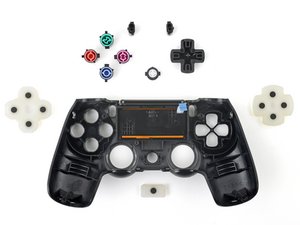 | コントローラーのボタンが押されたまま戻らない。 考えられる原因として、ボタンの隙間に溜まったゴミやホコリ、またはボタンの故障が挙げられます。 原因と解決方法のすべてを表示する。 |
| 6 つの解決方法 | DualShock 4 が振動しない |
 | コントローラーが振動しない。 考えられる原因として、バッテリーの故障、モーターの故障、振動機能がオフになっている、コントローラーの一般的な不具合、またはPS4とコントローラー間のワイヤレス接続が不安定なことが挙げられます。 原因と解決方法のすべてを表示する。 |
| 3つの解決方法 | DualShock 4 の電源が入らない |
 | コントローラーの電源が入らない。 考えられる原因として、バッテリー切れ、充電器の故障、バッテリーの故障、またはコントローラーの一般的な不具合が挙げられます。 原因と解決方法のすべてを表示する。 |
| 3つの解決方法 | DualShock 4タッチパッドが動かない |
 | タッチパッドが反応しない。 考えられる原因として、タッチパッドの故障、非対応のゲーム、ソフトウェアが古い、またはファームウェアの一般的な不具合が挙げられます。 原因と解決方法をすべて表示する。 |
| 2つの解決方法 | DualShock 4 アナログスティックがロックされて動かない |
 | アナログスティックを押し込むと、そのまま引っかかって戻ってこない。 考えられる原因として、ジョイスティックの隙間に溜まったゴミやホコリ、またはジョイスティックの破損や歪みが挙げられます。 原因と解決方法のすべてを表示。 |
| 4つの解決方法 | DualShock 4が充電しない |
 | コントローラーが充電できず、前面のライトも点灯しない。 考えられる原因として、ファームウェアの一般的な不具合、バッテリーの故障、充電ケーブルの不良、またはコントローラーの充電ポートの不良が挙げられます。 原因と解決方法のすべてを表示。 |
| 2の解決方法 | DualShock 4 がコンソールに繋がらない |
 | コントローラーの電源は入っていて動作するが、ゲーム機に接続できない。 考えられる原因として、ファームウェアの一般的な不具合や、Wi-Fiルーターによる接続制限が挙げられます。 原因と解決方法のすべてを表示。 |
| 2 つの解決方法 | DualShock 4のサウンドが出ない |
 | コントローラーのスピーカーから音が出ない。 考えられる原因として、コントローラーの音量が上がっていないか、ファームウェアに一般的な不具合があることが挙げられます。 原因と解決方法のすべてを表示 。 |
問題が解決できない場合は?
特定の問題に関するトラブルシューティングにはアンサーフォーラムを利用してください。もしくは他の誰かが同じ問題にぶつかり、既に解決しているかもしれません。
以下の翻訳者の皆さんにお礼を申し上げます:
en jp
100%

Midori Doiさんは世界中で修理する私たちを助けてくれています! あなたも貢献してみませんか?
翻訳を始める ›

159 件のコメント
My command buttons on my DualShock4 do not respond, even after a manual reset. The controller can still turn on the PS4 though. Do I just need to replace the controller entirely, as I do not want to waste time to try and fix it myself.
mantronik - 返信 共有
I learned that if your buttons are sticky, brush them with a slightly wet toothbrush. Let it sit for a couple of seconds then dry them.
John - 返信 共有
A In Depth Guide to fixing DS4 Connection Issues.
1. Put your DS4 in pairing mode by holding PS button and share simultaneously. The light bar should begin to flash white.
2. Connect the DS4 to the device via Bluetooth on any of the following devices. ( PC, Android, PS3 )
3. Disconnect the DS4 from the paired Bluetooth device. Make sure you disconnect directly from the bluetooth device. Once disconnected locate a pin or a small narrow object and push into the reset hole on the rear of the DS4. Hold in place for 10 seconds.
4. Connect the USB cable to the DS4 and proceed to power on the PS4. Once the system has loaded to the login screen it will ask you to press the PlayStation Button. This will iniate pairing between the DS4 and PS4. The DS4 should now be fully operable.
Make sure to follow steps exactly for best results.
4wrd4evr - 返信 共有
My ps4 controller makes à strange doubleclicking sound when i'm touching
The touchpad iT sounds like THE touchpad is à littlebit loose do you know how you change that
Ps sorry for THE bad english
Benjamin - 返信 共有
when i open my ps4 the controller starts to flash (like it tries to connect with the ps4) but the it turns orange and does not connect eventually.
Elisavet Parra - 返信 共有