この翻訳は機械によって生成されたものであり、まだ人間による校正は行われていません。 日本語を話せますか? レビューはこちらから。

Google Pixel XL ディスプレイアセンブリの交換

Arthur Shi とその他 12 人の作成者
最終更新日: 2026年7月31日
閲覧: 3.3万
統計データ:
- 過去24時間:
- 4
- 過去7日:
- 29
- 過去30日:
- 132
- 今までの合計
- 33,370
コメント: 32
手順に関する21件のコメント, 11件のガイドコメント
修理ガイドのコメントへ完了済み: 34 35
34人のユーザーがこのガイドを「完了」させました。あなたも加わりませんか?
あなたを含む、35人のユーザーがこのガイドを使って修理を「完了」させました。素晴らしいです!
お気に入り: 8 9
8人のユーザーがこのガイドをお気に入りに登録しています。あなたもリストに入れませんか?
あなたを含む、9人のユーザーがこのガイドをお気に入りに登録しています。
はじめに
手順 1 に進む ↓この修理ガイドはiFixitスタッフによって作成されたものであり、Googleによる認定を受けたものではありません。 iFixitの修理ガイドの詳細についてはこちらを参照してください。
このガイドでは、Google Pixel XLのディスプレイアセンブリ(スクリーンとデジタイザーを含む)を取り外し、交換する方法を説明します。
Pixel XLの補強されていないディスプレイパネルは非常に壊れやすく、強力な接着剤でフレームに固定されているため、修理が困難です。特に微細なひび割れがすでにある場合、ディスプレイが破損する可能性がかなり高いです。こじ開ける際は、必ず十分に熱を加え、細心の注意を払ってください。
必要な工具と部品


-
-
-
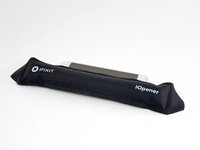
iOpenerを加熱し、ディスプレイの上端に2分間あてます。
-
こじ開ける前に、以下の領域に注意してください。
-
ディスプレイパネルに沿って配置された薄いディスプレイ用接着剤
-
厚い接着剤
-
損傷しやすいOLEDディスプレイパネル
-
こじ開ける際に損傷する可能性があるディスプレイケーブル
 FixBotに聞いてみる
-
-
-
縁が温かくなったら、縁の近くに吸盤カップを取り付けます。
-
吸盤カップを引き上げ、隙間にオープニングピックを差し込みます。
-
隙間を作るのが難しい場合は、縁を再度温めてからやり直してください。
-
-
-
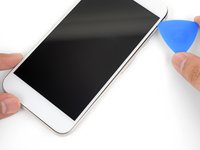
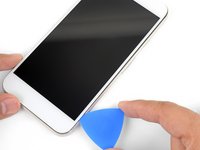
iOpenerを温め、スマートフォンの右端に2分間あてます。
-
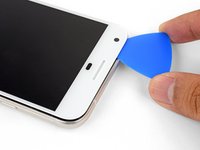
接着剤をすでに切り離した、本体上端付近にオープニングピックを差し込みます。
-
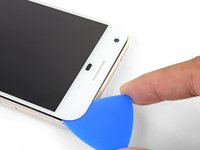
ゆっくりとピックを右角に沿って動かします。
-
慎重にピックをスマートフォンの右端に沿ってスライドさせ、接着剤を切り離します。
-
スマートフォンの左端についても同様の手順を繰り返します。
-
-
-
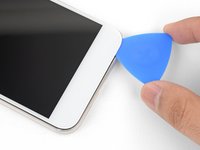
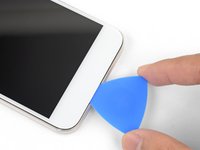
iOpenerを底面の端にあてて、2分間加熱する。
-
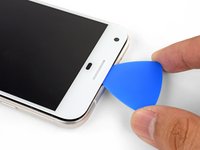
すでに接着剤を剥がした右端付近にピックを差し込む。
-
ピックを慎重に角に沿って動かす。
-
底面の端に沿ってピックをスライドさせ、ディスプレイ用接着剤を切り離す。
-
-
-
この手順で使用する道具:Magnetic Project Mat$19.95
-
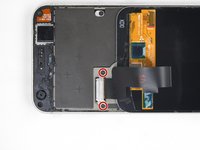
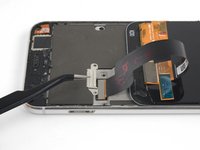
ディスプレイケーブルブラケットを固定している4mm T5ネジを2本外します。
-
ディスプレイケーブルブラケットを取り外します。
-
-








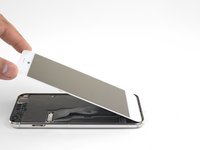
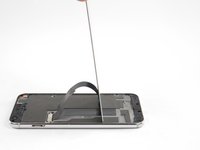
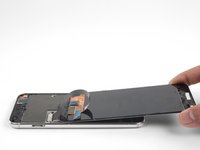




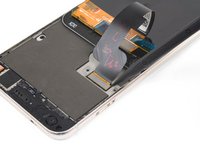
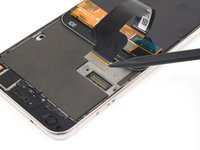


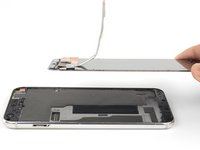
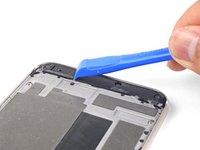
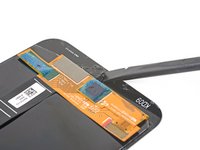
新しい交換用パーツを元のパーツと比較します。取り付ける前に、残っている部品を移行したり、新しいパーツから接着剤の裏紙を剥がしたりする必要がある場合があります。
スクリーン交換後にPixelの電源が入らない場合は、バッテリーを再接続した際にスマートフォンが静かに起動している可能性があります。スマートフォンが振動して電源が切れるまで、電源ボタンを数秒間押し続けてください。その後、スクリーンを再接続し、もう一度試してください。
デバイスを再組み立てするには、これらのインストラクションを逆の順番に従って作業を進めてください。
電子廃棄物(e-waste)は、R2またはe-Stewards認定リサイクル業者へ持ち込んでください。
修理がうまくいきませんでしたか?トラブルシューティングのヘルプについては、Google Pixel XL アンサーコミュニティをご確認ください。
34 の人々がこのガイドを完成させました。



11件のガイドコメント
I just connected the screen to the phone, but the screen doesn’t start. Do I have to restart in a special way the phone to make it works? All possible button combinations to restart the phone doesn’t work
The iFixIt iOpener tool is a complete waste of money. It didn’t loosen up the glue at all. I am requesting a refund on Amazon.com
Drew Hookway - 返信 共有
Hi Drew, sorry to hear that your iOpener didn’t work too well in your repairs. We like to think it’s a pretty valuable and inexpensive tool, but it does have its quirks — namely, not everyone’s microwave is specced to operate at the same temperatures, so not everyone will achieve the most optimal temperature during that heating process.
For what it’s worth, we do put a Lifetime Warranty on the iOpener tools, so our Support team would be happy to replace that one for you, if you’d like. If so, please reach out to them by using the Contact link on the help page: http://help.ifixit.com. Otherwise, you are welcome to request a refund via Amazon and we will oblige.
We wish you all the best in your future repairs.
Kadan Sharpe - 返信 共有
I am sure the iOpener does work, but it probably takes a long time to heat the adhesive enough for screen removal and would require several applications. I got one as part of my screen replacement kit, although I have a heat gun so I didn’t end up using it. That being said my screen took at least four minutes of heating, with some re-heating to remove the broken shards. I would also imagine that adhesives vary from manufacturer, since this is my first screen replacement all I know is that the adhesive on the Pixel XL is really strong!
Don’t forget to transfer the speaker cloth to the new screen. I got it all back together before realizing that there was just an ugly hole.
