メインコンテンツにスキップ
リペアコミュニティに参加 - アカウントの作成

AirPods Max Battery Replacement

必要な工具と部品

  1. AirPods Max Battery Replacement, Prepare your headset for disassembly: 手順 1、 2の画像 1 AirPods Max Battery Replacement, Prepare your headset for disassembly: 手順 1、 2の画像 2
    • Before starting your repair:

    • Unplug and remove all cables and accessories.

    • Let your AirPods Max's battery drain below 25%—a charged lithium‑ion battery may catch fire if damaged.

    • For information on how to check your AirPods Max battery status, go to this guide and scroll down to Check the charge status.

    • To help stabilize the ear cups and prevent scratching them, consider placing your AirPods Max on a soft, clean cloth.

    FixBotに聞いてみる

    コメントを追加

  2. AirPods Max Battery Replacement, Remove the right earpad: 手順 2、 2の画像 1 AirPods Max Battery Replacement, Remove the right earpad: 手順 2、 2の画像 2
    • The earpads are secured with magnets

    • Lift the right earpad (labeled R) straight up and remove it.

    FixBotに聞いてみる

    コメントを追加

  3. AirPods Max Battery Replacement, Remove the right ear cup: 手順 3、 3の画像 1 AirPods Max Battery Replacement, Remove the right ear cup: 手順 3、 3の画像 2 AirPods Max Battery Replacement, Remove the right ear cup: 手順 3、 3の画像 3
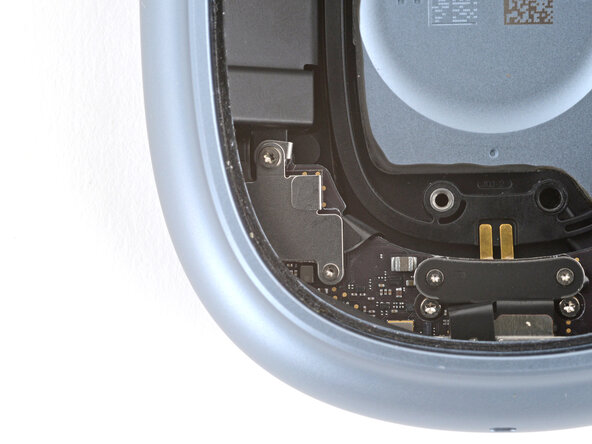
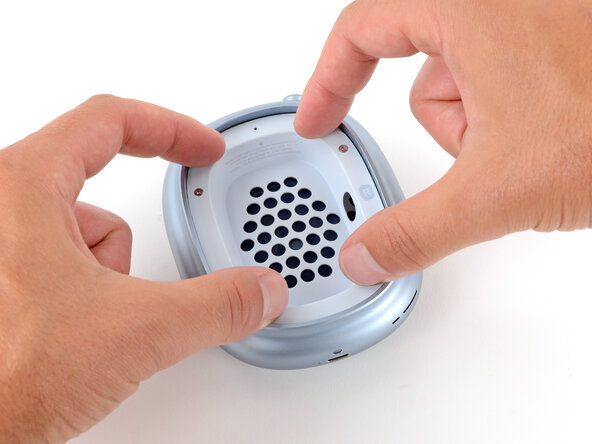
    • Removing the ear cup isn’t required, but can make the repair easier. You can leave the cup attached and remove it later if needed.

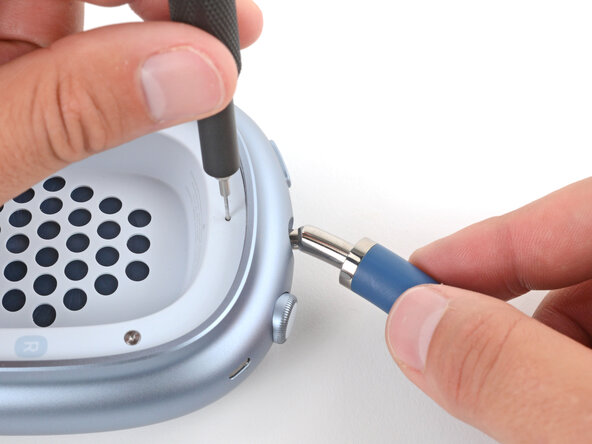
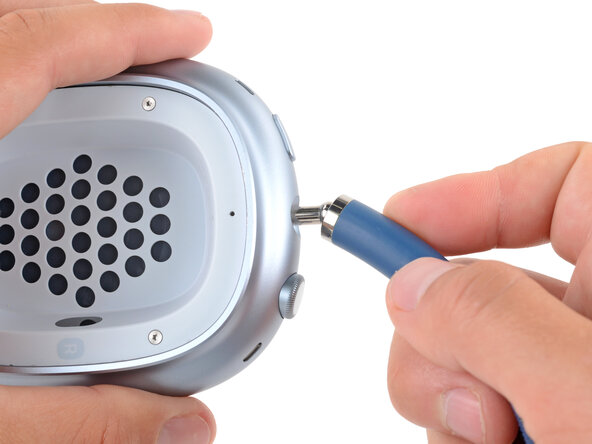
    • Insert a SIM eject tool, bit, or a small, straightened paperclip into the hole on the top edge of the right ear cup (labeled R).

    • Push down with your tool and pull the headband connector straight out of its socket.

    • The headband connector should slide out easily. If you're having trouble, reposition the tool and try again—you may need to angle the bit slightly.

    FixBotに聞いてみる

    コメントを追加

  4. AirPods Max Battery Replacement, Set the right ear cup down: 手順 4、 1の画像 1
    • Set the right ear cup down on a soft, clean cloth to prevent scratches and help stabilize the cup during your repair.

    FixBotに聞いてみる

    コメントを追加

  5. AirPods Max Battery Replacement, Turn the housing screws to the open position: 手順 5、 2の画像 1 AirPods Max Battery Replacement, Turn the housing screws to the open position: 手順 5、 2の画像 2
    • Turn these screws slowly and gently, stopping when you feel resistance—about 1/4 turn. If turned too far, the locking mechanism will break.

    • Use a P5 pentalobe screwdriver to turn (not remove) the four speaker housing screws to the unlocked position:

    • Turn the top left and bottom right screws counterclockwise.

    • Turn the top right and bottom left screws clockwise.

    FixBotに聞いてみる

    コメントを追加

  6. AirPods Max Battery Replacement, Soften the speaker housing adhesive: 手順 6、 3の画像 1 AirPods Max Battery Replacement, Soften the speaker housing adhesive: 手順 6、 3の画像 2 AirPods Max Battery Replacement, Soften the speaker housing adhesive: 手順 6、 3の画像 3
    この手順で使用する道具:
    iOpener
    $14.95
    • The perimeter of the speaker housing is secured to the cup with adhesive. This step shows a few methods to soften the adhesive so you can pry up the housing. If one isn't working, try a different method.

    • Option 1: Apply a few drops of high-concentration isopropyl alcohol (>90%) in the gap around the perimeter of the speaker housing. Wait one minute to allow the alcohol to soften the adhesive.

    • Option 2: Heat the speaker housing with an iOpener or hair dryer. Focus the heat around the perimeter, applying small amounts for short periods of time.

    • Don't heat the center of the speaker housing, or you'll damage the fragile mesh under the speaker cutouts and possibly the speaker.

    • For a detailed look at best practices for using a hair dryer, check out this guide.

    FixBotに聞いてみる

    コメントを追加

  7. AirPods Max Battery Replacement, Pry up the speaker housing: 手順 7、 3の画像 1 AirPods Max Battery Replacement, Pry up the speaker housing: 手順 7、 3の画像 2 AirPods Max Battery Replacement, Pry up the speaker housing: 手順 7、 3の画像 3
    この手順で使用する道具:
    iSesamo Opening Tool
    $9.99
    • The gap between the speaker housing and ear cup is extremely small. You'll need a thin tool such as a metal opening pick, iSesamo, or iFlex to pry up the housing.

    • Don't grip the iFlex or similar metal tools by the edges—they're sharp and may cut you. Consider wearing gloves to protect yourself.

    • Insert the flat side of your opening tool into the gap between the left side of the speaker housing and the lip of the ear cup (opposite the R marking).

    • Pry up the speaker housing until you can grip it with your fingers, applying constant pressure to allow the adhesive to separate.

    • If the housing isn't coming up, repeat the previous step and try again. Don't try and force the housing out or you may damage it.

    FixBotに聞いてみる

    コメントを追加

  8. AirPods Max Battery Replacement: 手順 8、 3の画像 1 AirPods Max Battery Replacement: 手順 8、 3の画像 2 AirPods Max Battery Replacement: 手順 8、 3の画像 3
    • Don't try to fully remove the speaker housing yet—a delicate ribbon cable still connects it to the ear cup.

    • Lift the speaker housing out of the ear cup to fully separate the remaining adhesive.

    • Flip the housing over the side of the cup and prop it up so you can access the cable.

    FixBotに聞いてみる

    コメントを追加

  9. AirPods Max Battery Replacement, Remove the speaker housing cable cover: 手順 9、 2の画像 1 AirPods Max Battery Replacement, Remove the speaker housing cable cover: 手順 9、 2の画像 2
    この手順で使用する道具:
    FixMat
    $36.95
    • Don’t let any screws snap onto the speaker driver diaphragm or they'll damage it. The screws will be drawn towards the center by the speaker's magnet.

    • Use a Torx Plus 1IP screwdriver to remove the 1.7 mm‑long screw securing the speaker housing cable cover.

    • Throughout this repair, keep track of each screw and make sure it goes back exactly where it came from.

    FixBotに聞いてみる

    コメントを追加

  10. AirPods Max Battery Replacement: 手順 10、 2の画像 1 AirPods Max Battery Replacement: 手順 10、 2の画像 2
    • Use tweezers to remove the cover.

    FixBotに聞いてみる

    コメントを追加

  11. AirPods Max Battery Replacement, Disconnect the speaker housing: 手順 11、 2の画像 1 AirPods Max Battery Replacement, Disconnect the speaker housing: 手順 11、 2の画像 2
    • Use a spudger to pry up and disconnect the speaker housing press connector.

    FixBotに聞いてみる

    コメントを追加

  12. AirPods Max Battery Replacement, Remove the speaker housing: 手順 12、 1の画像 1
    • Remove the speaker housing.

    FixBotに聞いてみる

    コメントを追加

  13. AirPods Max Battery Replacement, Remove the speaker driver screws: 手順 13、 3の画像 1 AirPods Max Battery Replacement, Remove the speaker driver screws: 手順 13、 3の画像 2 AirPods Max Battery Replacement, Remove the speaker driver screws: 手順 13、 3の画像 3
    • Grip the screws with tweezers while loosening and removing them. Don’t let the screws snap onto the diaphragm.

    • Use a Torx Plus 3IP screwdriver to remove three speaker driver screws:

    • Two 6.0 mm‑long screws

    • One 6.0 mm‑long screw that's slightly thicker than the other two

    • Remove the 5.1 mm‑long standoff screw using one of the two methods below:

    • Apply constant downward force to avoid damaging the screw.

    • Option 1: Stick a small flathead screwdriver into one of the four notches on top of the screw and use it to slowly turn the screw.

    • Option 2: Use a Torq-Set 6 screwdriver to remove the screw, applying constant downward force to avoid damaging the screw.

    FixBotに聞いてみる

    コメントを追加

  14. AirPods Max Battery Replacement, Remove the speaker driver: 手順 14、 3の画像 1 AirPods Max Battery Replacement, Remove the speaker driver: 手順 14、 3の画像 2 AirPods Max Battery Replacement, Remove the speaker driver: 手順 14、 3の画像 3
    • Lift the top edge of the speaker and remove it, being careful not to touch the diaphragm.

    • If you're having trouble, use the point of a spudger to start lifting the speaker.

    • Set the speaker aside in a place where it won't attract small metal objects.

    FixBotに聞いてみる

    コメントを追加

  15. AirPods Max Battery Replacement, Remove the battery connector cover: 手順 15、 2の画像 1 AirPods Max Battery Replacement, Remove the battery connector cover: 手順 15、 2の画像 2
    • Remove the two connector cover screws:

    • One 7.0 mm‑long Torx Plus 3IP screw

    • You may need tweezers to remove this screw.

    • One 1.7 mm‑long Torx Plus 1IP screw

    FixBotに聞いてみる

    コメントを追加

  16. AirPods Max Battery Replacement: 手順 16、 3の画像 1 AirPods Max Battery Replacement: 手順 16、 3の画像 2 AirPods Max Battery Replacement: 手順 16、 3の画像 3
    • Two tabs slot into place and secure the cover.

    • Slide the cover out of the slots and remove it.

    FixBotに聞いてみる

    コメントを追加

  17. AirPods Max Battery Replacement, Disconnect the battery: 手順 17、 2の画像 1 AirPods Max Battery Replacement, Disconnect the battery: 手順 17、 2の画像 2
    • Use the point of a spudger to pry up and disconnect the battery press connector (the smaller one, not the one that folds under the board).

    FixBotに聞いてみる

    コメントを追加

  18. AirPods Max Battery Replacement, Remove the battery screws: 手順 18、 3の画像 1 AirPods Max Battery Replacement, Remove the battery screws: 手順 18、 3の画像 2 AirPods Max Battery Replacement, Remove the battery screws: 手順 18、 3の画像 3
    この手順で使用する道具:
    Flexible Extension
    $6.99
    • Use a Torx Plus 5IP screwdriver to remove the two screws securing the sides of the battery cells.

    • Depending on your screwdriver, you may need to use a flexible extension to get a proper fit in the screw.

    • If the screw isn't coming out once fully loosened, use tweezers to pull it out.

    FixBotに聞いてみる

    コメントを追加

  19. AirPods Max Battery Replacement: 手順 19、 3の画像 1 AirPods Max Battery Replacement: 手順 19、 3の画像 2 AirPods Max Battery Replacement: 手順 19、 3の画像 3
    • Use a Torx Plus 3IP screwdriver to remove the three screws securing the battery cells:

    • Two 4.0 mm‑long screws

    • One 7.0 mm‑long screw

    • Make sure you remove the correct screw (which goes through the board), and not the one just to the left of it.

    • You may need to use tweezers to remove this screw.

    FixBotに聞いてみる

    コメントを追加

  20. AirPods Max Battery Replacement, Remove the battery: 手順 20、 3の画像 1 AirPods Max Battery Replacement, Remove the battery: 手順 20、 3の画像 2 AirPods Max Battery Replacement, Remove the battery: 手順 20、 3の画像 3
    • Slide the battery cells out of their recesses one at a time and remove them.

    • If either of the battery cells are swollen, take appropriate precautions.

    FixBotに聞いてみる

    コメントを追加

  21. AirPods Max Battery Replacement, Disassembly complete: 手順 21、 1の画像 1
    • Congratulations on completing disassembly! The remaining steps will show how to reassemble your AirPods Max.

    FixBotに聞いてみる

    コメントを追加

  22. AirPods Max Battery Replacement, Slide the battery into place: 手順 22、 3の画像 1 AirPods Max Battery Replacement, Slide the battery into place: 手順 22、 3の画像 2 AirPods Max Battery Replacement, Slide the battery into place: 手順 22、 3の画像 3
    • With the exposed sides of the battery cells facing down, slide the battery cable under the lip of the ear cup so it sits on top of the charging port.

    • Place both battery cells into their recesses.

    FixBotに聞いてみる

    コメントを追加

  23. AirPods Max Battery Replacement, Install the battery screws: 手順 23、 2の画像 1 AirPods Max Battery Replacement, Install the battery screws: 手順 23、 2の画像 2
    • Use a Torx Plus 3IP screwdriver to install the three screws securing the battery cells:

    • Two 4.0 mm‑long screws

    • One 7.0 mm‑long screw

    FixBotに聞いてみる

    コメントを追加

  24. AirPods Max Battery Replacement: 手順 24、 3の画像 1 AirPods Max Battery Replacement: 手順 24、 3の画像 2 AirPods Max Battery Replacement: 手順 24、 3の画像 3
    • Use a Torx Plus 5IP screwdriver to install the two screws securing the sides of the battery cells.

    • You may need to use tweezers to slide the screws into their holes.

    FixBotに聞いてみる

    コメントを追加

  25. AirPods Max Battery Replacement, Connect the battery: 手順 25、 1の画像 1
    • Use a spudger or your fingers to press down and connect the battery press connector.

    FixBotに聞いてみる

    コメントを追加

  26. AirPods Max Battery Replacement, Install the battery cable cover: 手順 26、 3の画像 1 AirPods Max Battery Replacement, Install the battery cable cover: 手順 26、 3の画像 2 AirPods Max Battery Replacement, Install the battery cable cover: 手順 26、 3の画像 3
    • Slide the battery connector cover's two tabs into their slots and lay the cover in place.

    FixBotに聞いてみる

    コメントを追加

  27. AirPods Max Battery Replacement: 手順 27、 2の画像 1 AirPods Max Battery Replacement: 手順 27、 2の画像 2
    • Install the two connector cover screws:

    • One 7.0 mm‑long Torx Plus 3IP screw

    • One 1.7 mm‑long Torx Plus 1IP screw

    FixBotに聞いてみる

    コメントを追加

  28. AirPods Max Battery Replacement, Lay the speaker driver in place: 手順 28、 3の画像 1 AirPods Max Battery Replacement, Lay the speaker driver in place: 手順 28、 3の画像 2 AirPods Max Battery Replacement, Lay the speaker driver in place: 手順 28、 3の画像 3
    • Gently lay the speaker driver into place, making sure the side with gold connector pins lines up with their contacts in the shell.

    FixBotに聞いてみる

    コメントを追加

  29. AirPods Max Battery Replacement, Install the speaker driver screws: 手順 29、 3の画像 1 AirPods Max Battery Replacement, Install the speaker driver screws: 手順 29、 3の画像 2 AirPods Max Battery Replacement, Install the speaker driver screws: 手順 29、 3の画像 3
    • Grip the screws with tweezers while installing them so they don't snap onto the speaker.

    • Use a Torx Plus 3IP screwdriver to install three speaker driver screws:

    • One 6.0 mm‑long screw that's slightly thicker than the other two

    • Two 6.0 mm‑long screws

    • Install the 5.1 mm‑long standoff screw using a small flathead or Torq-Set 6 screwdriver.

    • Apply constant downward force to avoid damaging the screw.

    FixBotに聞いてみる

    コメントを追加

  30. AirPods Max Battery Replacement, Replace the speaker housing adhesive: 手順 30、 3の画像 1 AirPods Max Battery Replacement, Replace the speaker housing adhesive: 手順 30、 3の画像 2 AirPods Max Battery Replacement, Replace the speaker housing adhesive: 手順 30、 3の画像 3
    • Before installing the speaker housing, check the condition of its adhesive—it will be on the underside of the housing, on the metal lip of the ear cup, or on both.

    • Use tweezers and scissors to remove any sections of bunched-up or overlapping adhesive that would prevent the housing from sitting perfectly flat.

    • Try to remove as little adhesive as possible. If all the adhesive looks fine, you can skip this step.

    • Apply thin, double-sided adhesive where you removed the original, using short sections to help match the curve of the lip.

    • Don't remove the top adhesive liners yet—the adhesive should not be exposed.

    • Make sure not to double up on any sections (i.e. don't apply adhesive on the ear cup if it's already on the corresponding spot on the housing).

    FixBotに聞いてみる

    コメントを追加

  31. AirPods Max Battery Replacement, Connect the speaker housing: 手順 31、 2の画像 1 AirPods Max Battery Replacement, Connect the speaker housing: 手順 31、 2の画像 2
    • Hold the speaker housing up and use your finger to press down and reconnect its press connector.

    FixBotに聞いてみる

    コメントを追加

  32. AirPods Max Battery Replacement, Install the housing cable cover: 手順 32、 2の画像 1 AirPods Max Battery Replacement, Install the housing cable cover: 手順 32、 2の画像 2
    • Slide the tab on the connector cover into its slot and lay the cover down.

    FixBotに聞いてみる

    コメントを追加

  33. AirPods Max Battery Replacement: 手順 33、 2の画像 1 AirPods Max Battery Replacement: 手順 33、 2の画像 2
    • Use a Torx Plus 1IP screwdriver to install the 1.7 mm‑long screw securing the speaker housing cable cover.

    FixBotに聞いてみる

    コメントを追加

  34. AirPods Max Battery Replacement, Secure the speaker housing: 手順 34、 3の画像 1 AirPods Max Battery Replacement, Secure the speaker housing: 手順 34、 3の画像 2 AirPods Max Battery Replacement, Secure the speaker housing: 手順 34、 3の画像 3
    • If you installed replacement adhesive, remove any liners to expose the adhesive.

    • Flip the speaker housing into the cup and press it into place around the perimeter.

    • Don't press on the center of the housing or you may damage the grille and/or speaker underneath.

    FixBotに聞いてみる

    コメントを追加

  35. AirPods Max Battery Replacement, Turn the housing screws to the locked position: 手順 35、 2の画像 1 AirPods Max Battery Replacement, Turn the housing screws to the locked position: 手順 35、 2の画像 2
    • Turn these screws slowly and gently, stopping when you feel resistance—about 1/4 turn. If turned too far, the locking mechanism will break.

    • Use a P5 pentalobe screwdriver to turn the four speaker housing screws to the locked position:

    • Turn the top left and bottom right screws clockwise.

    • Turn the top right and bottom left screws counterclockwise.

    FixBotに聞いてみる

    コメントを追加

  36. AirPods Max Battery Replacement, Install the right ear cup: 手順 36、 3の画像 1 AirPods Max Battery Replacement, Install the right ear cup: 手順 36、 3の画像 2 AirPods Max Battery Replacement, Install the right ear cup: 手順 36、 3の画像 3
    • The headband and ear cup should be oriented in the "closed" position (how they would be when stored in a case) when installing them.

    • Hold the ear cup steady with one hand, and use your free hand to firmly push the headband connector into its slot, twisting it slightly—it should click into place.

    • The connector should slide in easily. If it's not, make sure you're installing the ear cup on the correct side.

    FixBotに聞いてみる

    コメントを追加

  37. AirPods Max Battery Replacement, Install the right earpad: 手順 37、 2の画像 1 AirPods Max Battery Replacement, Install the right earpad: 手順 37、 2の画像 2
    • Place the earpad into its cup—it should "snap" into place.

    FixBotに聞いてみる

    コメントを追加

終わりに

Congratulations on completing your repair!

For optimal performance, calibrate your newly installed battery after completing this guide.

Take your e-waste to an R2 or e-Stewards certified recycler.

Repair didn’t go as planned? Try some basic troubleshooting, or ask our Answers community for help.

キャンセル: このガイドを終了できませんでした。

Spencer Day

メンバー登録日: 09/14/22

194,932 ポイント

1,243のガイドは作成済み

1件のガイドコメント

Is there a difference between approach in Gen 1 (lightning) and Gen 2 (Usb C)? Is the battery the same?

Kristoffer Seyffarth - 返信 共有

コメントを追加

統計データ:

過去 24時間: 53

過去 7 日: 405

過去 30 日: 1,541

今までの合計 3,861