AirPort/Bluetoothカード
|
2件の回答 0 スコア |
How do I upgrade my mid 2014 21.5 iMac? |
|
2件の回答 0 スコア |
Any step by step guide to upgrading mid 2014 iMac 21.5 to SSD |
|
1 件の回答 2 スコア |
iMac CPU + Ram Upgrade Compatibility |
|
1 件の回答 0 スコア |
White stains on motherboard |
パーツ
- iMac Intel 21.5" (2012-2019) Adhesive Strips
- iMac Intel 21.5" (Late 2012-2019) SSD Upgrade Kit
- External SSD Enclosure for Select Mid 2013 to Mid 2015 Macs
- Crucial MX500 2 TB SSD
- iMac Intel 21.5" and 27" (Late 2012-Early 2019) SSD Temperature Sensor
- iMac 21.5" (Late 2013-2017) SATA Cable
- iMac Intel 21.5" or 27" (Late 2013-Late 2014) Airport/Bluetooth Board
- iMac Intel 21.5" (Late 2013-Mid 2014, Select Models) Blade SSD Upgrade Bundle
ツール
- Spudger
- Tweezers
- Microfiber Cleaning Cloths
- iFixit Thermal Paste
- Plastic Cards
- TR8 Torx Security Screwdriver
- T5 Torx Screwdriver
- Phillips #0 Screwdriver
- iMac Opening Wheel
- TR10 Torx Security Screwdriver
- Arctic Silver ArctiClean
- iMac Intel 21.5" Cardboard Service Wedge
- IA-3952 - Max Professional Consumable Isopropyl Alcohol
モデル
A1418 Mid 2014 iMac14,4 1.4 GHz
製品情報と背景
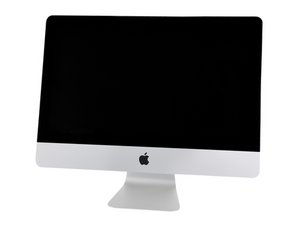
2014年6月18日に発売された21.5インチ iMac EMC 2805は仕様が改良されたモデルですが、前モデルEMC 2638と同じ内部構造です。モデル番号はA1418、 EMC番号は2805で、どちらもディスプレイフット部分に記載されています。
特長
- Intel Core i5もしくは i7プロセッサ、半田付けされており、アップグレードが不可。オプションは次の通り。
- 1.4 GHz デュアルコアプロセッサ Intel Core i5
- 2.7 GHz クアッドコアIntel Core i5
- 2.9 GHz クアッドコアIntel Core i5
- 3.1 GHz クアッドコアIntel Core i7
- 半田付けされた8 GB、アップグレード不可のRAM。
- ベーシックモデルは8 GBのみ利用可能で、ミドルおよびハイエンドモデルは購入時に16 GBへカスタマイズ可能です。なお、2.7 GHzおよび2.9 GHzモデルはアップグレード可能ですが、そのためには本体を完全に分解する必要があります。
- 500 GBハードドライブ (5400 rpm)、
- 設定可能な1TBハードドライブ (5400 rpm), 1TB Fusion Drive もしくは256 GB SSD、512 GB SSD(ミドルおよびハイエンドモデル対象)。
- Intel HD Graphics 5000, Iris Pro graphicsもしくはNVIDIA GeForce GT 750Mグラフィックプロセッサ、GDDR5メモリの1GB付き。
- 4つのUSB 3.0 ポートと2つのThunderboltポート
- 802.11ac Wi-Fi, IEEE 802.11a/b/g/n 互換性と Bluetooth 4.0
追加情報
以下の翻訳者の皆さんにお礼を申し上げます:
100%
Midori Doiさんは世界中で修理する私たちを助けてくれています! あなたも貢献してみませんか?
翻訳を始める ›