
Sony FDL-220R Watchman Button Replacement

Sam Putnam とその他
最終更新日: 2015年1月9日
閲覧: 794
統計データ:
- 過去24時間:
- 4
- 過去7日:
- 15
- 過去30日:
- 72
- 今までの合計
- 794
コメント: 0
このガイドにコメントを投稿した人はいません。何かコメントはありませんか?(日本語可)
修理ガイドのコメントへ完了済み: 0 1
誰もこのガイドで修理を「完了」させていません。あなたが一番目になりませんか?
1人のユーザーがこのガイドを使って修理を「完了」させました。あなたもその一人です!素晴らしいです!
お気に入り: 0 1
誰もこのガイドをお気に入りに登録していません。一番最初の登録者になりませんか?
1人がこのガイドをお気に入りに登録しています。あなたもそのうちの一人です!
はじめに
手順 1 に進む ↓This guide will show you how to clean and/or replace the buttons and switches on the Sony FDL-220R Watchman. Steps include basic disassembly of the Sony FDL-220R Watchman, and tools include a Phillips #00 Screwdriver and a solution of warm water and baking soda.
必要な工具と部品
ツール
-
-
Detailing Brush4.9


-
-
-
Press down on the textured area and push towards the bottom of the device.
-
Gently remove the battery cover.
-
Remove the three AA batteries.
 FixBotに聞いてみる
-
-
-
Locate the five 5x11mm screws surrounding the battery compartment.
-
Remove screws with a Philips #00 screwdriver.
-
-
-
-
Grasp the entire back half of the Watchman's casing.
-
Snap off the casing from the bottom of the device.
-
Gently pull off entire back casing.
-
-
-
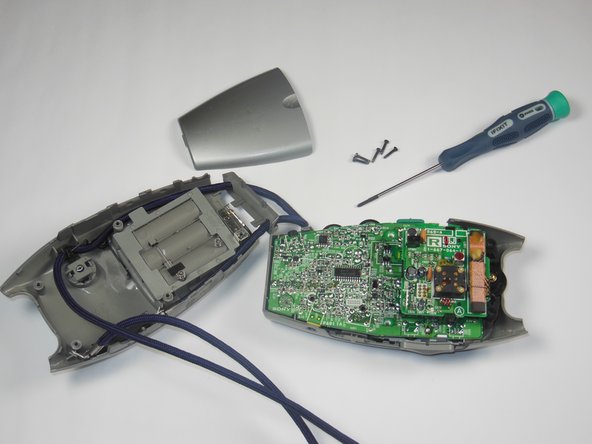
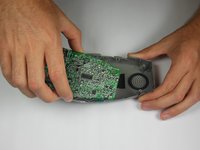
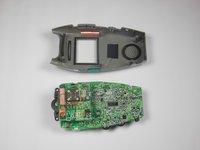
Carefully grasp the entire circuit board.
-
Pull the circuit board off of the device's plastic casing.
-
-
-
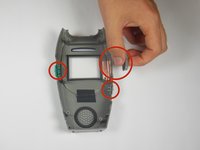
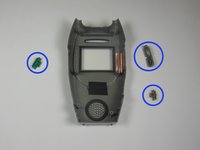
Locate the thee plastic buttons/switches on the sides of the plastic grey casing.
-
Remove all three buttons/switches.
-
If the buttons/switches are dirty, clean them in warm water and dry thoroughly.
-
If one of the buttons/switches is broken, simply replace it with a new one.
-
-






To reassemble your device, follow these instructions in reverse order.

チーム

Baylor, Team 4-5, Williams Fall 2014 Baylor, Team 4-5, Williams Fall 2014人のメンバー
BU-WILLIAMS-F14S4G5
4 メンバー
48のガイドは作成済み
