はじめに
This guide will demonstrate how to remove the battery from the N. Garmin inReach Explorer Plus. The battery allows the Garmin Device to be able to run and operate at a functional level for up to 75 hours. The battery may be in need of removing if the Garmin device won’t operate normally. This could be due to the battery being damaged or even dead. For more details about problems as to why the battery should be removed, visit our Troubleshooting guide page. Along with this the battery could potentially be swollen. This would mean that the battery is punctured and can cause dangerous gases to leave the battery. To handle this dangerous problem, have the device uncharged and unplugged when removing the battery. While removing the battery make sure the batteries are cooled down and not heated and be sure to replace and dispose of the old battery properly. Lastly, knowing all the possible problems that can lead to a faulty battery, there are many different safety guides to take into consideration. Metal should not be anywhere near the removal of the battery process, both terminals on the battery cannot be in contact with any other item, wear protective gear such as eyewear, gloves, etc, and finally, practice safe lifting procedures when removing the battery. This will lead to less likelihood of dropping and breaking the damaged battery which would cause hazardous gases to be leaked. To learn more about safety precautions please visit the battery safety procedure page here.
必要な工具と部品
-
-
-
Using the TR6 Torx Security screwdriver, remove six 10 mm screws from the back cover of the device.
 FixBotに聞いてみる
-
-
-
-
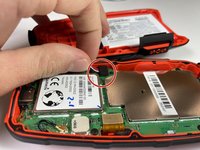
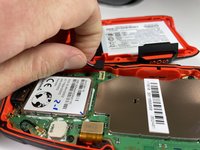
Gently grasp the battery wire and disconnect it from the device.
-
Remove the battery from the device.
-
-


To reassemble your device, follow these instructions in reverse order.
For optimal performance, after completing this guide, calibrate your newly installed battery.
Take your e-waste to an R2 or e-Stewards certified recycler.

チーム

Clemson, Team 5-4, Hunter Fall 2021 Clemson, Team 5-4, Hunter Fall 2021人のメンバー
CLEM-HUNTER-F21S5G4
4 メンバー
20のガイドは作成済み
