

Microphone Issues after screen replacement
After I replaced the screen on my pixel 7 pro my bottom microphone must've stopped working, atleast I think it's bottom, I can make phone calls but not use google assistant or any sound recording apps.
評価: 73
 3
3
 2
2
評価: 145
3
1
Hey guys there is an app named 'Voice Recorder & Voice Memos' (orange one) that when it's open and recording on the background, all other apps use the working microphone (the earpiece one), But it drained my battery very quickly..
So I created the same behavior but in a much more convenient and battery efficient way.
it solved the issue on my Google Pixel 7 Pro, you are welcome to use it as well :) -> MicLock
このアンサーは役に立ちましたか?
Thanks, Dan! I've tried this with several apps and can confirm it works!
Cool happy to hear :) what phone do you use?
MicLock works great on my pixel 7 Thanks!
評価: 25
1
From Reddit; Hello, nothing worked for my 7 pro until I found this work around. Download Voice Recorder & Voice Memos, open the app, and try recording. You can stop recording but dont close the app. The mic will start working. I set the app preference to work in background and never close the app. Then, open the Recorder app. It will start working normally. Transcription works beautifully. All phone apps work normally while Voice Recorder & Voice Memos is open in the background.
BINGO the voice recorder and voice memos fixed my issue, tried all the other crap and none worked. I suspect the app uses the other mics, so may not fix the lower mic issue, but allows one of the other for voice recording. Either way, I can now voice text again, my large thumbs don't fit the small keyboard well. Thanks ReviewTall3533!!!
このアンサーは役に立ちましたか?
I have same issue. Don't find any solution.
I've tried this. It uses only the camera microphone (above the display), not the lower one that doesn't work since my screen replacement
I have the same probleme. Don't find any solution.
This app drained my battery very quickly, so I created the same behavior but in a much more convenient and battery efficient way.
it solved the issue on my Google Pixel 7 Pro, you are welcome to use it as well :) -> https://github.com/Dan8Oren/MicLock
評価: 193
1
1
 1
1
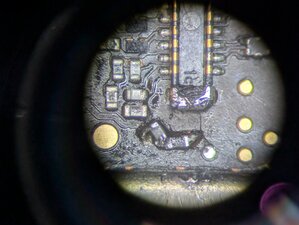
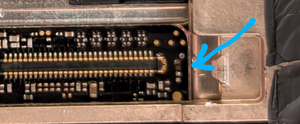
I had this problem and just fixed it. The issue is that one or two small SMD components can get torn off the board if you are not careful when prying off the clamp that holds the screen connector on. They may take the pads with them when they are torn off. When they are restored, the Mic 1 circuit works again. A very helpful chap called Stefan from GadgetUK's Discord identified the components. They are both 0201 size. One is a 51 Ohm resistor (missing component above top of blue arrow in pic 2 below) and the other is a 33pf capacitor (missing component just below tip of blue arrow in pic 2). You can see I tore both pads off the resistor but was able to tin and pick up from a tiny area of the pad that was left. The two pads in the middle were joined. Basically, the resistor and capacitor are joined in the middle at the middle pads. The other end of that capacitor is just a ground. You will need a microscope, tweezers, flux, a steady hand, a very fine tip and some very thin leaded solder. I used 0.3mm.I didn't take the board out but got a little solder on the screen connector but mistake. It cleaned up with braid but is very delicate and there is not much room in there so be very careful.
このアンサーは役に立ちましたか?
過去 24時間: 2
過去 7 日: 3
過去 30 日: 43
今までの合計 1,523




1件のコメント
have the same problem
konst さんによる