メインコンテンツにスキップ
リペアコミュニティに参加 - アカウントの作成

HP ElitePad 900 Battery Replacement

必要な工具と部品

  1. HP ElitePad 900 Battery Replacement, Front Panel Assembly: 手順 1、 1の画像 1
    • Unscrew the two 2.8mm Phillips #000 screws near the power connector.

    FixBotに聞いてみる
  2. HP ElitePad 900 Battery Replacement: 手順 2、 2の画像 1 HP ElitePad 900 Battery Replacement: 手順 2、 2の画像 2
    • Use a suction cup to pull the display assembly up.

    FixBotに聞いてみる
  3. HP ElitePad 900 Battery Replacement: 手順 3、 2の画像 1 HP ElitePad 900 Battery Replacement: 手順 3、 2の画像 2
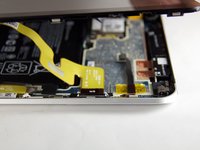
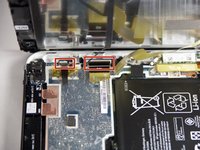
    • Use the tip of a spudger to disconnect the two display ZIF connectors.

    FixBotに聞いてみる
  4. HP ElitePad 900 Battery Replacement, Battery: 手順 4、 1の画像 1
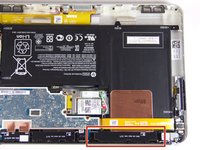
    • Remove the six 2.2mm Phillips #000 screws securing the battery to the device.

    FixBotに聞いてみる
  5. HP ElitePad 900 Battery Replacement: 手順 5、 1の画像 1
    • Disconnect and move the wires out of the way.

    FixBotに聞いてみる
  6. HP ElitePad 900 Battery Replacement: 手順 6、 2の画像 1 HP ElitePad 900 Battery Replacement: 手順 6、 2の画像 2
    • Lift cover.

    FixBotに聞いてみる
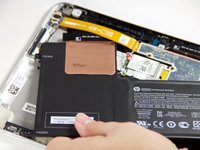
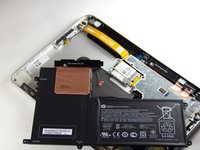
  7. HP ElitePad 900 Battery Replacement: 手順 7、 2の画像 1 HP ElitePad 900 Battery Replacement: 手順 7、 2の画像 2
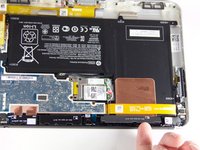
    • Slide out the battery.

    FixBotに聞いてみる
終わりに

To reassemble your device, follow these instructions in reverse order. Take your e-waste to an R2 or e-Stewards certified recycler.

13 の人々がこのガイドを完成させました。

作成者

6人の作成者と共同で作成されました。

Kyle Marques

メンバー登録日: 09/03/15

889 ポイント

6のガイドは作成済み

チーム

USF Tampa, Team 12-4, Blackwell Fall 2015 USF Tampa, Team 12-4, Blackwell Fall 2015人のメンバー

USFT-BLACKWELL-F15S12G4

4 メンバー

6のガイドは作成済み

2件のガイドコメント

Great Job took 10 min from start to finish!

Dan Goo - 返信 共有

One way to remove screen assembly without a suction cup is to use a piece of duct tape folded onto to itself leaving a small amount of the adhesive portion exposed. This creates a little handle. You can then stick it to assembly and lift it out easily.

Matt Brunk - 返信 共有

コメントを追加

統計データ:

過去 24時間: 1

過去 7 日: 8

過去 30 日: 70

今までの合計 13,006