

identify CPU/RAM/Storage specs from a non-working board
the board doesn't turn on. how can I identify the CPU/RAM/Storage from the board? are there any markings on the notebook or the body itself?
Thanks
評価: 131
 5
5
 4
4
評価: 861.1千
1.5千
978
 2.4千
2.4千
@garegin like @livfe already mentioned, the easiest way to identify your specs would be by using your computers serial number. It will give you the memory as well as the storage information.
The only other way would be by looking at the memory IC's itself. Each one of the 8GB and 16GB configuration uses 3 different IC's, which leaves you with a total of 6 possibilities. Commonly used IC's are HYNIX, Micron, or Samsung. Apple, in it's habitual paranoid way, may have had those IC's marked with their own part numbers:
333S00125
333S00068
333S00166
333S00126
333S00070
333S00167
those are all LDDR3-2133 BGA178 IC's but are different and not just in capacity.
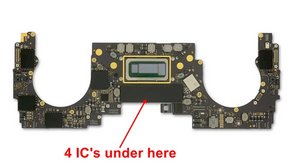
As for your "SSD" storage, again, you are dealing with NAND IC's Apple commonly uses Toshiba IC's for these (may or may not be marked in the APPLE Way :-) Here are the numbers for those
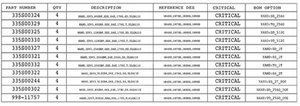
and here are the locations
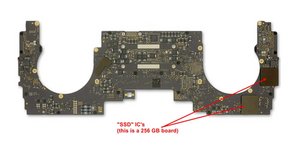
The boards with a higher storage capacity do have additional solder points. I do hope that this will help you out. Of course, you could also just post a couple of good pictures of your logic board (both sides and IC covering removed) so we could help you further with this.
このアンサーは役に立ちましたか?
評価: 502.6千
35
347
977
If you are trying to fix your system you’ll need to get ahold of the schematics and board view drawings.
Here’s a primer on how the board is laid out if that is what you are looking for MacBookPro 13インチ (2X Thunderbolt) 2019の分解 reference Step 5.
このアンサーは役に立ちましたか?
No, I'm not trying to fix the board. I simply want the RAM/Storage specs. But I'm going to sell the notebook as is. Also, mine is the MacBook Pro (13-inch, 2019, Four Thunderbolt 3 ports) model.
@garegin - Identifying your exact config is a bit tricky as Apple no longer offers system details via the serial number. As it turns out Apple only offered two CPU configs:
- 2019 13” MacBook Pro Core i5 2.4GHz
- 2019 13” MacBook Pro Core i7 2.8 GHz
But the RAM & Storage came a few different setups. Do you still have your sales slip paperwork as that will have that listed. If you can get the system running long enough you can get the details within the About This Mac.
The CPU is i7 2.8GHz. But the board itself has no indications of RAM/SSD?
@garegin - The only way is to take note of the chips ID and Google it to see if you can find it. Or if you can find the systems schematics the chips ID will be listed. The RAM is within the SoC module and you could have two or four Flash chips.
評価: 8千
33
42
8
You can try a Serial number lookup by using the serial number located on the underside cover.
A list of all 2019 Models might help also. Apples site has This model listed.
このアンサーは役に立ちましたか?
@livfe - EveryMac can’t offer deeper details in the S/N lookup as Apple stopped referencing it within the S/N a few years ago in the newer models from 2016
@danj Yes but it still helps to narrow down the model in question.
@oldturkey03 MacBook Air (13-inch, 2017)
Purchase Date: September 2019
Serial Number: FVFZ8BBMJ1WK
That is all I get from that site... Everymac gives 2 models the 1.8 Ghz i5 & the 2.2 Ghz i7
@livfe perfect. Thank you
過去 24時間: 1
過去 7 日: 5
過去 30 日: 20
今までの合計 478



