はじめに
If you notice that your ionvac SmartClean V2 has a shorter runtime or decreased performance, it may be time to replace the batteries. This guide demonstrates how to remove the lithium-ion battery unit from the bottom of the robot vacuum.
This is a quick and simple repair, but handle all parts gently during removal and reinstallation. Before you begin, power off your ionvac SmartClean V2 and disconnect it from the charging dock.
Caution: If you notice the battery is puffy or smells strange, it may be swollen. Be careful when handling a swollen battery as it can be a fire risk. For more information on swollen batteries and what to do with them, take a look at the What to Do With a Swollen Battery guide.
必要な工具と部品
-
-
-
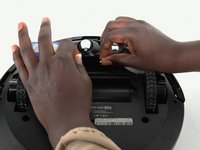
Flip your ionvac upside down so the wheels are pointed upwards and the side brushes are furthest from you.
 FixBotに聞いてみる
-
-
-
-
Remove the 2 screws that secure the battery door.
-
Lift the battery door to reveal the lithium ion battery.
-
-
-
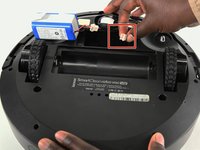
Disconnect the battery by squeezing down on the cream-colored tabs of the battery connectors and pulling them apart.
-
-


To reassemble your device, follow these instructions in reverse order.
ある他の人がこのガイドを完成しました。

チーム

University of Colorado Denver, Team 1-1, Campeau Fall 2023 University of Colorado Denver, Team 1-1, Campeau Fall 2023人のメンバー
UCDENVER-CAMPEAU-F23S1G1
7 メンバー
22のガイドは作成済み
2件のガイドコメント
need instructions for installation of battery in TZUMI ion vac smart clean robo vac V4
Eileen Meyer - 返信 共有
need instructions for installation of battery in TZUMI ionvac smart clean robovac V4
Eileen Meyer - 返信 共有
