はじめに
This guide will teach you how to access, remove, and replace your iRobot Roomba 692 battery. If you are replacing the battery, ensure that you have the right battery for the Roomba 692 prior to removal.
Remember to review the iRobot Roomba 692 Troubleshooting Page before attempting any maintenance or repairs on your vacuum.
必要な工具と部品
-
-
-
To access the iRobot Roomba 692 battery compartment, flip your iRobot Roomba 692 upside down.
-
Using the Phillips #0 screwdriver, remove the 4.0mm screw in the center of the yellow side brush and lift the part out.
 FixBotに聞いてみる
-
-
-
-
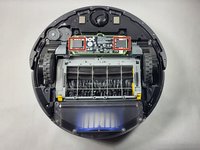
Use a Phillips #0 screwdriver to remove the four black 3.5 mm screws on the bottom panel.
-
Remove the bottom panel.
-
-
-
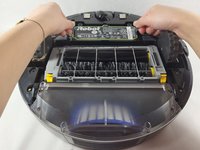
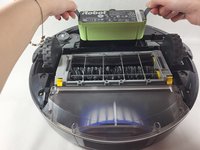
Using the black tabs on both short ends of the battery pack, gently pull the battery up and out of its slot.
-
-


To reassemble your device, follow these instructions in reverse order.
ある他の人がこのガイドを完成しました。

チーム

UMass Dartmouth, Team 1-4, Shaddix Spring 2023 UMass Dartmouth, Team 1-4, Shaddix Spring 2023人のメンバー
UMASSD-SHADDIX-S23S1G4
4 メンバー
10のガイドは作成済み
