この翻訳は機械によって生成されたものであり、まだ人間による校正は行われていません。 日本語を話せますか? レビューはこちらから。

iPod Classic ロジックボードの交換

閲覧: 12万
統計データ:
- 過去24時間:
- 9
- 過去7日:
- 81
- 過去30日:
- 354
- 今までの合計
- 115,407
コメント: 49
手順に関する38件のコメント, 11件のガイドコメント
修理ガイドのコメントへ完了済み: 86 87
86人のユーザーがこのガイドを「完了」させました。あなたも加わりませんか?
あなたを含む、87人のユーザーがこのガイドを使って修理を「完了」させました。素晴らしいです!
お気に入り: 25 26
25人のユーザーがこのガイドをお気に入りに登録しています。あなたもリストに入れませんか?
あなたを含む、26人のユーザーがこのガイドをお気に入りに登録しています。
はじめに
手順 1 に進む ↓iPodのロジックボードは、iPodのすべての機能を制御しています。
必要な工具と部品


-
-
-
iPodの表面と裏面の間の継ぎ目に、もう一つのプラスチック製開口ツールを差し込みます。そして、2つのツール間に少なくとも4cm弱程度のスペースを空け、ツールをそのままの状態にします。
-
-
-
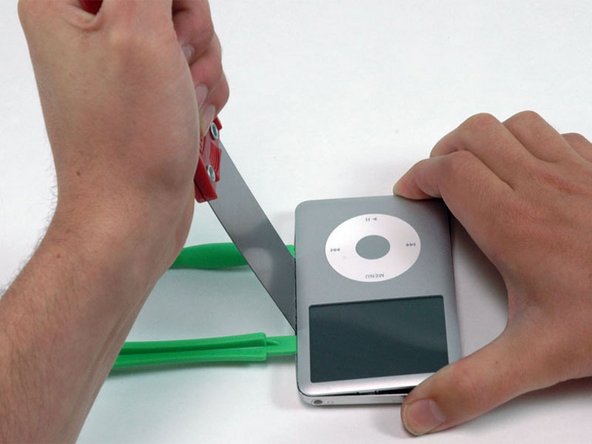
パテナイフを2つの開口部ツールの継ぎ目に、慎重に斜めの角度で3mm程度挿入します。
-
パテナイフでリアパネルの外縁を外せたら、パテナイフを垂直にして、慎重に(かつ、時間をかけてしっかりと)パテナイフを開口部に差し込んでいるツールと本体の隙間に真っ直ぐ差し込みます。
-
-
-
ディスプレイ中央付近で、プラスチック製開口ツールで作った隙間に、メタル製スパッジャーをゆっくりと差し込みます。
-
メタル製スパッジャーを使って、iPod上部にある1つのクリップを外します。
-
-
-
上部コーナーから開口ツールを取り出し、iPodの表面と裏面の間の継ぎ目に差し込みます。その際、2つのツール間に少なくとも約3.8cmのスペースを空けます(反対側と同じように)。
-
-
-
斜めの角度にして、パテナイフを2つの開口ツールの継ぎ目に3mm程度ほど差し込みます。
-
パテナイフでリアパネルの外縁が外れたら、パテナイフが垂直になるように角度をつけ、慎重に(しかし確実に)、プラスチック製開口ツールの隙間を通して、iPodの中にまっすぐ差し込みます。
-
パテナイフの後ろのリアパネルを指で押して、曲がらないように固定します。パテナイフを少しだけ曲げて、iPodのこちら側のメタルタブの全体を外します。
-
-
-
片手でフロントパネルアセンブリを掴み、もう片方の手でリアパネルを掴みます。
-
2つのコンポーネントを同時に接続しているリボンケーブルにダメージを与えないよう細心の注意を払いながら、フロントパネルの上部とリアパネルの上部を互いに(ヒンジとしてのiPodの底部を考えてください)引き離して、リアパネル上の残りのクリップを慎重に外します。
-
-
-
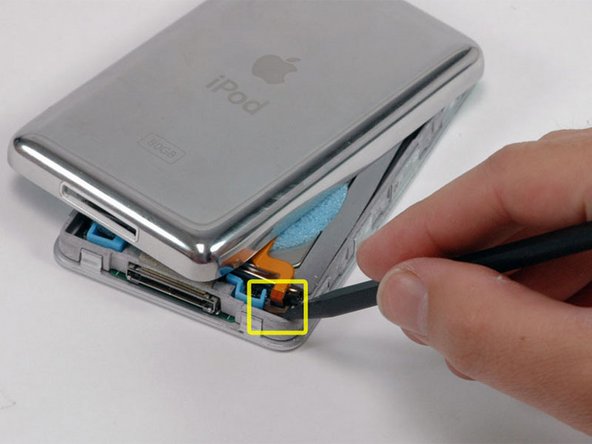
スパッジャーを使って、オレンジ色のバッテリーリボンを固定しているコネクタを上部にスライドします。ケーブルを解放するには、ロッキングバーを約2mm持ち上げるだけで十分です。
-
コネクタからオンレジ色のバッテリーリボンをスライドして、取り出します。
-
-
-
ハードドライブを片手で持ち上げて、下にあるヘッドフォンジャックのリボンにアクセスできるようにします。
-
ヘッドホンジャックのリボンを固定しているプラスチックのタブをスパジャーでこじ開けます。タブを90度上に回転させ、リボンケーブルを外します。
-
オレンジ色のヘッドフォンジャックリボンをスライドさせて、コネクタから外します。
-
これでリアパネルがiPodから外れました。
-
-
-
さて、iPod Classicの内部コンポーネントを解放することによって生じたダメージを修理しましょう!下部ケースのメタル製クリップの少なくとも一つは上向きに曲がっている可能性が高いです。これらのクリップは、リアパネルに再度取り付けるために、全て下向きにしなければなりません。
-
-
-
フレームワークからハードドライブを回転させて外し、コネクタが上向きになるように置きます。
-
スパッジャーを使って、オレンジ色のハードドライブリボンを固定しているプラスチック製タブを跳ね上げます。リボンケーブルを解放しながら、タブを90度上向きに回転させます。
-
-
-
オレンジ色のハードドライブリボンケーブルをスライドして、コネクタから直接取り出します。
-
iPodのハードドライブを交換する際に、ゴム製のマウントブラケットとフォームパッドが付属していない場合は、これらのパーツを古いドライブから交換用のドライブに移植してください。
-
-
-
-
-
スパッジャーを使って、オレンジ色のディスプレイリボンを固定しているプラスチック製タブを跳ね上げます。リボンケーブルを解放しながら、ディスプレイ側にタブを90度上向きに回転させます。
-
-
-
クリックホイールがロジックボードの下から見えるように移動します。
-
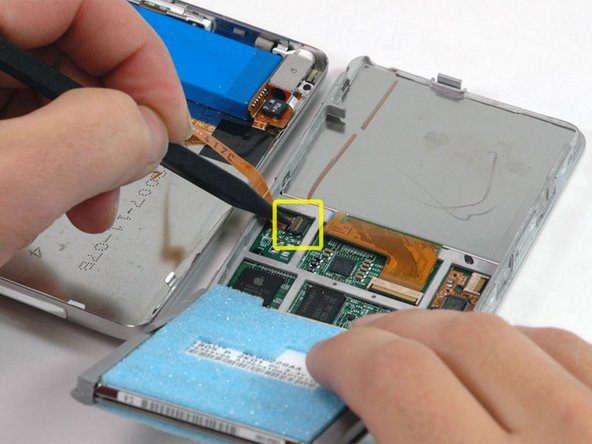
スパッジャーを使用して、オレンジ色のクリックホイールリボンケーブルを固定しているプラスチック製のタブを跳ね上げます。タブが90度回転し、リボンケーブルが解放されます。
-
-
-
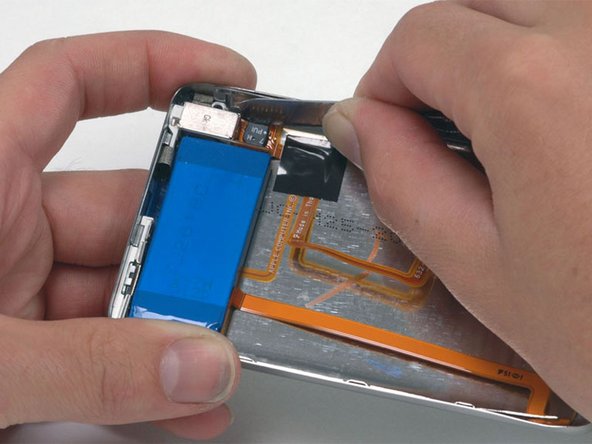
スパッジャーを使用して、クリックホイールのケーブルをロジックボードから持ち上げます。ケーブルを過度に曲げると、ケーブル上の電子部品が損傷する恐れがあるため注意してください。
-
-
-
スパッジャーを使って、オレンジ色のハードドライブリボンを固定しているプラスチック製タブを跳ね上げます。リボンケーブルを解放しながら、タブを90度上向きに回転させます。
-
-
-
コネクタからオレンジ色のハードドライブリボンケーブルをスライドして、取り出します。ケーブルは、ロジックボードに接着剤で留められています。ケーブルがすぐに外れない場合、ケーブルを注意深く引き上げて接着剤をほぐします。
-
-

 FixBotに聞いてみる








ケースを閉じる前に、デバイスが正しく動作することを確認してください。
デバイスを再組み立てするには、これらのインストラクションを逆の順番に従って作業を進めてください。
86 の人々がこのガイドを完成させました。
以下の翻訳者の皆さんにお礼を申し上げます:
100%


これらの翻訳者の方々は世界を修理する私たちのサポートをしてくれています。 あなたも貢献してみませんか?
翻訳を始める ›

11件のガイドコメント
I was able to open my 160 GB skinny classic with out too much trouble. I used a utility knife blade to get the initial toehold between the back and front panels, once that was accomplished, I used the thin metal leaves of a disassembled automotive feeler gauge to release the latches and keep it open while I worked, better and safer than xacto knives.
So I followed this guide (and a bunch of others) for tearing down and replacing parts of my iPod. I finished everything, and I'm sure I got the right parts, but now it won't turn on. It says "The iPod software update server could not be contacted. The server does not support this version of iTunes." While I understand that iFixIt is not an Apple company, I feel like my iPod should be fixed? I'm pretty sure I did everything correctly.... Why won't it turn on?
Sara French - 返信 共有
I often do things like this at my work but this day all goes wrong. With Step 7 at this “How to”, I damaged my Display and with Step 18 I damaged the Power suply connector. Nice day!!! &&^&
Maik Snyders - 返信 共有
