メインコンテンツにスキップ
リペアコミュニティに参加 - アカウントの作成

Zerodate T26 Scroll Wheel CMOS Sensor Replacement

必要な工具と部品

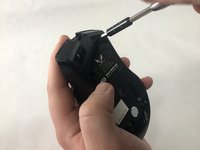
  1. Zerodate T26 Scroll Wheel CMOS Sensor Replacement, Scroll Wheel: 手順 1、 2の画像 1 Zerodate T26 Scroll Wheel CMOS Sensor Replacement, Scroll Wheel: 手順 1、 2の画像 2
    • Remove the top shell of the mouse by using the iFixit opening tool to carefully pry the top shell apart from the bottom plate.

    FixBotに聞いてみる

    コメントを追加

  2. Zerodate T26 Scroll Wheel CMOS Sensor Replacement: 手順 2、 2の画像 1 Zerodate T26 Scroll Wheel CMOS Sensor Replacement: 手順 2、 2の画像 2
    この手順で使用する道具:
    Tweezers
    $4.99
    • Remove the adhesive pads using precision tweezers or the iFixit opening tool.

    • Adhesive pads are located on the bottom of the mouse.

    FixBotに聞いてみる

    コメントを追加

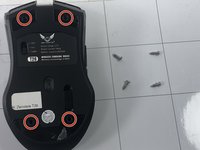
  3. Zerodate T26 Scroll Wheel CMOS Sensor Replacement: 手順 3、 2の画像 1 Zerodate T26 Scroll Wheel CMOS Sensor Replacement: 手順 3、 2の画像 2
    • Use a Phillips #00 screwdriver to remove all four 10 mm screws.

    FixBotに聞いてみる

    コメントを追加

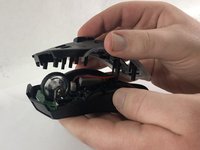
  4. Zerodate T26 Scroll Wheel CMOS Sensor Replacement: 手順 4、 2の画像 1 Zerodate T26 Scroll Wheel CMOS Sensor Replacement: 手順 4、 2の画像 2
    • Carefully pull the middle shell apart from the bottom plate.

    • The circuit board should then be visible and attached to the bottom plate.

    FixBotに聞いてみる

    コメントを追加

  5. Zerodate T26 Scroll Wheel CMOS Sensor Replacement: 手順 5、 2の画像 1 Zerodate T26 Scroll Wheel CMOS Sensor Replacement: 手順 5、 2の画像 2
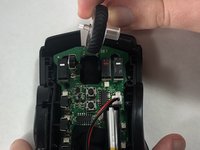
    • Remove the scroll wheel by pushing it to the right and pulling up.

    FixBotに聞いてみる

    コメントを追加

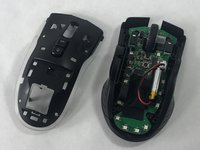
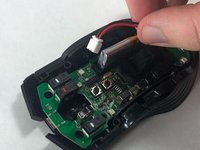
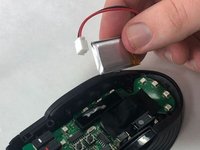
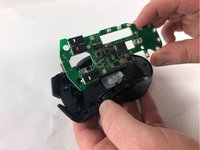
  6. Zerodate T26 Scroll Wheel CMOS Sensor Replacement, Scroll Wheel CMOS Sensor: 手順 6、 3の画像 1 Zerodate T26 Scroll Wheel CMOS Sensor Replacement, Scroll Wheel CMOS Sensor: 手順 6、 3の画像 2 Zerodate T26 Scroll Wheel CMOS Sensor Replacement, Scroll Wheel CMOS Sensor: 手順 6、 3の画像 3
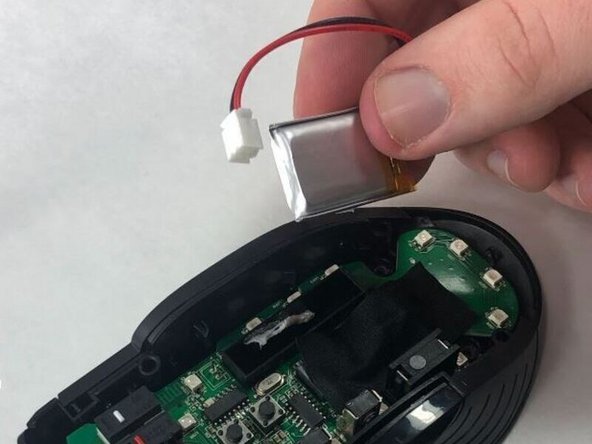
    • Remove the battery from the mouse as shown, and set it to the side for later.

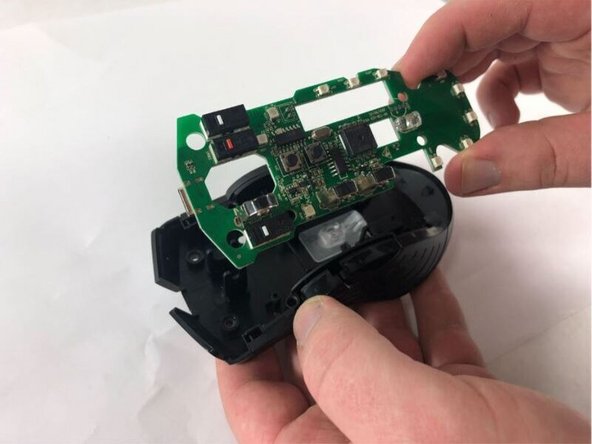
    • This should now allow you to gently pull the circuit board up from the bottom of the mouse.

    • Please be very careful when pulling up the circuit board. Yanking it out could result in further damage to the mouse. Make sure you go slow and steady.

    FixBotに聞いてみる

    コメントを追加

  7. Zerodate T26 Scroll Wheel CMOS Sensor Replacement: 手順 7、 1の画像 1
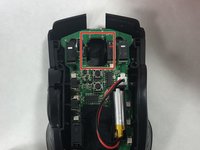
    • To replace the CMOS sensor attached to the circuit board, carefully de-solder it from the board, found here.

    • Please be sure to review safety guidelines and guided steps on soldering before attempting to remove any circuitry. In order to keep yourself safe and your mouse undamaged, please follow the guide found here to learn to properly solder.

    FixBotに聞いてみる

    コメントを追加

終わりに

To reassemble your device, follow these instructions in reverse order.

キャンセル: このガイドを終了できませんでした。

作成者

3人の作成者と共同で作成されました。

Janice Rullan

メンバー登録日: 03/13/23

662 ポイント

6のガイドは作成済み

チーム

UMass Dartmouth, Team 2-3, Petersen Spring 2023 UMass Dartmouth, Team 2-3, Petersen Spring 2023人のメンバー

UMASSD-PETERSEN-S23S2G3

4 メンバー

6のガイドは作成済み

0件のガイドコメント

コメントを追加

統計データ:

過去 24時間: 0

過去 7 日: 4

過去 30 日: 18

今までの合計 379