メインコンテンツにスキップ
リペアコミュニティに参加 - アカウントの作成

The Claw Music Player Cleaning

必要な工具と部品

  1. The Claw Music Player Cleaning, Bottom Cover: 手順 1、 1の画像 1
    • Place The Claw in upright position with controls facing you.

    FixBotに聞いてみる
  2. The Claw Music Player Cleaning: 手順 2、 1の画像 1
    • Gently flip The Claw machine upside down with the controls facing you.

    FixBotに聞いてみる
  3. The Claw Music Player Cleaning: 手順 3、 1の画像 1
    • Remove all ten screws from the bottom cover using a Phillips #1 screwdriver.

    • You will need a screwdriver with a long thin neck to fit in the screw holes.

    FixBotに聞いてみる
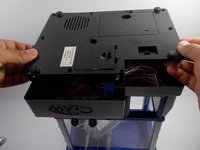
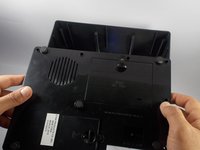
  4. The Claw Music Player Cleaning: 手順 4、 2の画像 1 The Claw Music Player Cleaning: 手順 4、 2の画像 2
    • Slide the bottom cover off to the side.

    • Do not completely remove bottom cover as it is still connected to wires.

    FixBotに聞いてみる
  5. The Claw Music Player Cleaning: 手順 5、 1の画像 1
    • Complete removal of the bottom cover is not necessary, however if you feel you need to take the cover completely off the machine to complete your task it can be done by the following process.

    • You will need to cut the two green wires attached to the music player.

    • Then you will need to cut the white wire that leads to the battery compartment.

    • Finally you will need to cut the black wire leading to the battery compartment as well.

    • The complete removal of the bottom cover requires the cutting and soldering of wires. For help with soldering reference: はんだ付けとはんだ除去の作業ガイド.

    FixBotに聞いてみる
  6. The Claw Music Player Cleaning, The Claw Music Player Cleaning: 手順 6、 1の画像 1
    • Once you have removed the bottom cover you should have clear access to the music player.

    • Locate the music player and check to see if it is visibly dirty or clogged.

    • If there is any amount of dust or dirt on the music player it should be cleaned.

    • Using the straw that comes with your air duster, aim the duster in a way that the air will push the dust away from the music player.

    • If cleaning the music player is not enough, you may need to refer to the Music Player Replacement Guide

    FixBotに聞いてみる
  7. The Claw Music Player Cleaning: 手順 7、 1の画像 1
    この手順で使用する道具:
    Tweezers
    $4.99
    • You DO NOT want to force the dust further into the music player by directing the air into the player.

    • If there are any large pieces of lint or dust in the sound port, those can be removed with your precision tweezers.

    • Once you are certain you have removed all of the dust and dirt from the music player you should reassemble the device and test it.

    FixBotに聞いてみる
終わりに

To reassemble your device, follow these instructions in reverse order.

ある他の人がこのガイドを完成しました。

作成者

3人の作成者と共同で作成されました。

Alain Pierre

メンバー登録日: 03/22/16

1,188 ポイント

9のガイドは作成済み

チーム

UMass Dartmouth, Team 4-8, Catania Spring 2016 UMass Dartmouth, Team 4-8, Catania Spring 2016人のメンバー

UMASSD-CATANIA-S16S4G8

3 メンバー

18のガイドは作成済み

0件のガイドコメント

コメントを追加

統計データ:

過去 24時間: 5

過去 7 日: 12

過去 30 日: 69

今までの合計 1,062