メインコンテンツにスキップ
リペアコミュニティに参加 - アカウントの作成

PowerBook G3 Pismo Inverter Replacement

必要な工具と部品

  1. PowerBook G3 Pismo Inverter Replacement, Keyboard: 手順 1、 1の画像 1
    • Turn the keyboard locking screw so that it is parallel to the space bar.

    • Pull the keyboard release tabs toward you and lift up on the keyboard until it pops free.

    • Lift the keyboard out by pulling it up and away from you. Rest the keyboard, face down, on top of the track pad.

    FixBotに聞いてみる

    コメントを追加

  2. PowerBook G3 Pismo Inverter Replacement: 手順 2、 1の画像 1
    • Pull the keyboard ribbon straight up from the logic board. Place the keyboard aside.

    • The connector may be tight. Gently rock the connector from side to side while pulling directly upward to free it. You can use this technique on many of the cards and cables you'll be disconnecting.

    • Make sure you have removed the laptop battery and CD/DVD modules from the expansion bays before proceeding.

    FixBotに聞いてみる

    コメントを追加

  3. PowerBook G3 Pismo Inverter Replacement: 手順 3、 1の画像 1
    • Your laptop should look approximately like this.

    FixBotに聞いてみる

    コメントを追加

  4. PowerBook G3 Pismo Inverter Replacement, Heat Shield: 手順 4、 1の画像 1
    • Remove the two silver Phillips #1 screws that attach the heat shield to the internal metal framework.

    • Lift the heat shield up and pull it toward you.

    FixBotに聞いてみる

    コメントを追加

  5. PowerBook G3 Pismo Inverter Replacement: 手順 5、 1の画像 1
    • Your laptop should look approximately like this.

    FixBotに聞いてみる

    コメントを追加

  6. PowerBook G3 Pismo Inverter Replacement, Airport Card: 手順 6、 1の画像 1
    • Skip this step if your computer does not have an Airport card installed.

    • Firmly grasp the plastic tab attached to the Airport card and pull up and then to the right.

    • The Airport card is still attached to the antenna cable, so don't just yank it out of the slot.

    FixBotに聞いてみる

    コメントを追加

  7. PowerBook G3 Pismo Inverter Replacement: 手順 7、 1の画像 1
    • Disconnect the antenna cable from the Airport card.

    FixBotに聞いてみる

    コメントを追加

  8. PowerBook G3 Pismo Inverter Replacement, PRAM Battery: 手順 8、 1の画像 1
    • Pull the battery cable directly up from the logic board.

    • Remove the battery from its holder by pulling up and to the left.

    FixBotに聞いてみる

    コメントを追加

  9. PowerBook G3 Pismo Inverter Replacement: 手順 9、 1の画像 1
    • Your laptop should look approximately like this.

    FixBotに聞いてみる

    コメントを追加

  10. PowerBook G3 Pismo Inverter Replacement, Heat Sink: 手順 10、 1の画像 1
    • Remove the long silver Phillips #1 screw from the heat sink.

    • Remove the two T8 Torx screws that attach the heat sink to the processor.

    FixBotに聞いてみる

    コメントを追加

  11. PowerBook G3 Pismo Inverter Replacement: 手順 11、 1の画像 1
    • Lift the heat sink up from the left side and pull it out.

    • If you need to mount the heat sink back into the laptop, we have a thermal paste guide that makes replacing the thermal compound easy.

    FixBotに聞いてみる

    コメントを追加

  12. PowerBook G3 Pismo Inverter Replacement, Processor: 手順 12、 1の画像 1
    • Grasp the plastic tab on the processor's right side and pull it directly up.

    • Some processors may be missing the plastic pull tab. In this case, we suggest using a non-metal tool to gently pry up the processor. Slip the tool's thin edge under the front right corner of the processor and carefully pry it up.

    FixBotに聞いてみる

    コメントを追加

  13. PowerBook G3 Pismo Inverter Replacement: 手順 13、 1の画像 1
    • Your laptop should look approximately like this.

    FixBotに聞いてみる

    コメントを追加

  14. PowerBook G3 Pismo Inverter Replacement, Modem: 手順 14、 1の画像 1
    • Remove the black Torx screw from the right side of the modem.

    • Remove the small black plastic rectangle with four holes.

    FixBotに聞いてみる

    コメントを追加

  15. PowerBook G3 Pismo Inverter Replacement: 手順 15、 1の画像 1
    • Use the tips of your fingers, a spudger, or a flat non-metal tool to get under the modem's edge and pry it up from its socket.

    FixBotに聞いてみる

    コメントを追加

  16. PowerBook G3 Pismo Inverter Replacement: 手順 16、 1の画像 1
    • Disconnect the cable from the right side of the modem.

    FixBotに聞いてみる

    コメントを追加

  17. PowerBook G3 Pismo Inverter Replacement, Hard Drive: 手順 17、 1の画像 1
    • Grasp the orange cable at the left end of the hard drive and disconnect it from the logic board.

    • Try to grasp the cable on the plastic connector rather than on the flexible cable section.

    FixBotに聞いてみる

    コメントを追加

  18. PowerBook G3 Pismo Inverter Replacement: 手順 18、 1の画像 1
    • Grasp the plastic tab and pull the hard drive up and to the left, making sure that the metal bracket doesn't catch on the black plastic casing.

    FixBotに聞いてみる

    コメントを追加

  19. PowerBook G3 Pismo Inverter Replacement: 手順 19、 1の画像 1
    • Your laptop should look approximately like this.

    FixBotに聞いてみる

    コメントを追加

  20. PowerBook G3 Pismo Inverter Replacement, Clutch Cover: 手順 20、 1の画像 1
    • Push the display back so that it lies flat.

    • Slip your index finger or a nylon tool under the clutch cover near the power button and pull gently upward until you feel it come free.

    • Repeat the previous step on the left side.

    FixBotに聞いてみる

    コメントを追加

  21. PowerBook G3 Pismo Inverter Replacement: 手順 21、 1の画像 1
    • Lift the clutch cover up and off, rotating it toward yourself.

    FixBotに聞いてみる

    コメントを追加

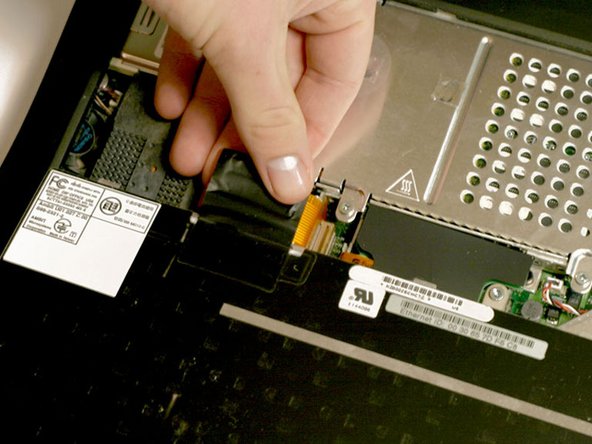
  22. PowerBook G3 Pismo Inverter Replacement, Inverter: 手順 22、 1の画像 1
    • Grasp the orange display data cable and disconnect it from the logic board.

    FixBotに聞いてみる

    コメントを追加

  23. PowerBook G3 Pismo Inverter Replacement: 手順 23、 1の画像 1
    • Remove the single black Torx screw that fastens the display cable to the plastic casing.

    • Grasp the thin display inverter board at its left end; lift up and rotate toward yourself.

    • There are two tabs that hold the display inverter in place; these are what you need to get past in order to pull the board free.

    FixBotに聞いてみる

    コメントを追加

  24. PowerBook G3 Pismo Inverter Replacement: 手順 24、 1の画像 1
    • Disconnect the white inverter cable from the right end of the board

    FixBotに聞いてみる

    コメントを追加

  25. PowerBook G3 Pismo Inverter Replacement: 手順 25、 1の画像 1
    • Disconnect the inverter plug, pulling directly up from the logic board.

    FixBotに聞いてみる

    コメントを追加

終わりに

To reassemble your device, follow these instructions in reverse order.

キャンセル: このガイドを終了できませんでした。

ある他の人がこのガイドを完成しました。

添付文書

作成者

2人の作成者と共同で作成されました。

iRobot

メンバー登録日: 09/24/09

1 ポイント

636のガイドは作成済み

0件のガイドコメント

コメントを追加

統計データ:

過去 24時間: 1

過去 7 日: 21

過去 30 日: 67

今までの合計 8,299