この翻訳は機械によって生成されたものであり、まだ人間による校正は行われていません。 この言語を話せますか? レビューはこちら.
はじめに
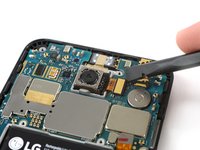
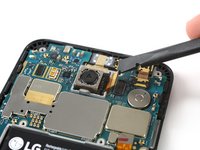
この修理ガイドを使用して、Nexus 5Xのリアカメラを取り外します。
デバイスを再組み立てする際、部品を再び取り付けるために交換用の接着剤が必要になります。
必要な工具と部品
-
-
-
SIMカード取り出し用ツールを使ってSIMカードトレイ上の穴に差し込みます。
-
ツールを押し込むと、SIMカードトレイが外れます。
-
SIMカードトレイを取り出します。
 FixBotに聞いてみる
-
-
-
-
-
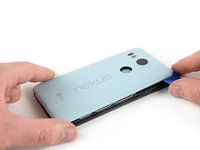
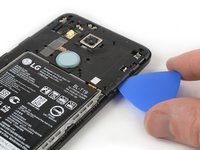
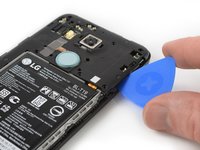
SIMカードトレイスロットの開口部分にピックを差し込んで、リアパネルを固定している最初のプラスチック製クリップを外すため、横向きにピックを捻ります。
-
開口ピックをデバイス上部端に差し込み、スライドしながら、リアパネルを固定しているプラスチックのクリップを外します。
-
-
-
開口ピックをわずか斜めにひねり上げて、リアパネルを掴める程度まで開きます。
-
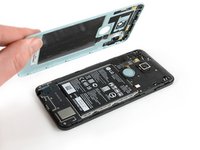
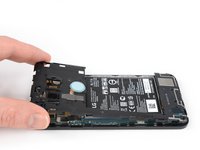
指紋認証センサーの隣に、さらに2つのプラスチック製クリップがあります。これらをリアパネルが解放されるまでゆっくりと外します。
-
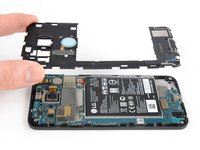
リアパネルを取り外します。
-
-
-
-
-






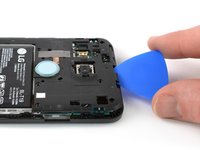
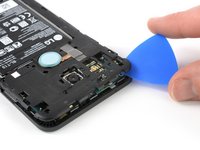


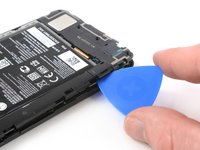
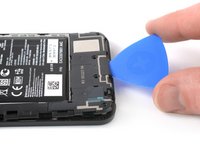






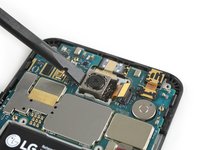
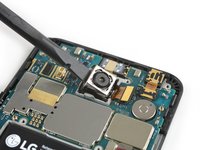


可能であれば、新しい接着剤を取り付けてデバイスを再度密閉する前に、電源を入れて修理が正しく行われたか確認してください。
デバイスを再組み立てするには、これらのインストラクションを逆の順番に従って作業を進めてください。
修理がうまくいきませんでしたか?トラブルシューティングについては、Nexus 5X アンサーコミュニティを確認してください。
11 の人々がこのガイドを完成させました。
以下の翻訳者の皆さんにお礼を申し上げます:
100%


これらの翻訳者の方々は世界を修理する私たちのサポートをしてくれています。 あなたも貢献してみませんか?
翻訳を始める ›

7件のガイドコメント
Hi! I just replaced the entire screen panel on my Nexus 5x because it stopped working (it flipped 180* the screen and the image it showed was mirrored -- completely impossible to use the phone). I read several reviews describing the same issue and fixing it by replacing the screen panel. Now I'm having issues with the camera. The front camera works, but the back one doesn't. I reopened the phone to check it was plugged in correctly to the motherboard, and it was. Is there a way to figure out if it's the actual camera that's not working or if it has something to do with the motherboard?
Thanks! -MJ
Hello,
I replaced the back camera, but unfortunately the autofocus of the new camera does not work. All pictures are blurred. When I open the camera-app a "click-noise" can be heard. I also installed 3rd-party app, which has the option to change the focus manually. But that did not work as well. I also did a secure boot, but that also did not solve the problem. Do you have an idea, what I can do?
Thanks in advance,
Klaus
I had a similar issue. After replacing the camera, the auto focus wouldn't work anymore. I did not test it with a manual focus app.
After some research i found out that this could have been caused by a faulty connection of the ribbon cable.
I reopened the phone, detached the ribbon cable and firmly pressed it on again. Had to repeat this twice, and after the second time the camera is doing auto focus again!
