はじめに
Use this guide to remove or replace the battery in your Motorola Droid 4.
If your battery is swollen, take appropriate precautions.
必要な工具と部品
-
-
Insert the rear cover removal tool, or a paper clip, in the hole near the back camera lens.
-
Slide the cover down to remove.
 FixBotに聞いてみる
-
-
-
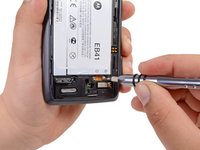
この手順で使用する道具:T5 Torx Screwdriver$5.49
-
Use the T5 Torx Screwdriver to remove both 2.5 mm screws from the battery cable.
-
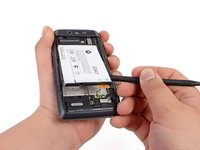
Use the Spudger to unstick the battery.
-


To reassemble your device, follow these instructions in reverse order.
25 の人々がこのガイドを完成させました。

17件のガイドコメント
Worked great ! Ordered battery fro Amazon and with Torx kit...5 minute job !
The battery in my phone started swelling so I ordered a battery from Amazon. Changing the battery was easy, but now the battery icon has a red question mark in it. How do I reset the battery icon?
