はじめに
このガイドを参照して、 MacBook Air 11インチ Mid 2012.のSSDを交換もしくはアップグレードをします。 MacBook Airは独自のストレージドライブコネクタを使用しています。そのため、アダプタを使用しない場合は、標準M.2ドライブと 互換性がありません。
この修理を行う前に、できる限り現在使用中のSSDのバックアップをしてください。それから インターネットの回復もしくは create a bootable external drive を確認してください。それからmacOSを新ドライブにインストールする準備が完了します。macOSを新しいドライブにインストールし、データを新しいSSDに移行する準備が整います。
最後に、MacBook AirからオリジナルSSDを交換する前に、macOS 10.13 High Sierra (もしくはそれ以降の macOS)にインストールすることをお勧めします。ほとんどの新SSDには、HighSierraより前のバージョンのmacOSにはない更新されたストレージドライバーが必要です。
必要な工具と部品


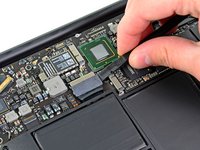


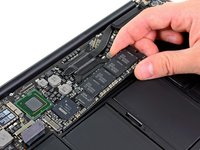
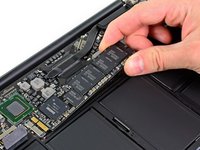
デバイスを再組み立てする際は、これらの手順を逆の順番に従って作業を進めてください。
52 の人々がこのガイドを完成させました。
以下の翻訳者の皆さんにお礼を申し上げます:
100%


これらの翻訳者の方々は世界を修理する私たちのサポートをしてくれています。 あなたも貢献してみませんか?
翻訳を始める ›


4件のガイドコメント
Excellent instructions. Very easy to do. I used this screwdriver to remove the screws from the bottom of the case: https://www.amazon.com/gp/product/B00N1R...
and I used the Pentalobe-6 from this set to remove the screw holding in the OEM SSD:
https://www.amazon.com/gp/product/B01FE2...
After removing the stock drive, I installed a Samsung M.2 EVO 850 512Gb drive. It is working quite well. I used this adapter so that the M.2 drive fit in my 2012 Macbook Air:
How do we reinstall MacOS?
I am 10 years old I fixed the mac I did this even the Geek squad couldn’t do it and now it works! without your guide.
admin free - 返信 共有
I have a MBA mid 2012 11” which no longer powers up. The battery has been in bad condition since a while and now the charging indicator remains amber no matter how long I charge it. So I assume it might be a battery issue. Unfortunately, I cannot find a supplier shipping batteries to Hawaii, but I found an identical machine on ebay (that will ship to Hawaii), except that it has 4GB RAM instead of 8GB. Provided my SSD is functional (which I assume) can I simply put my SSD into that 4GB RAM machine, and it will start up without any further modification?
Guido eMail - 返信 共有
