メインコンテンツにスキップ
リペアコミュニティに参加 - アカウントの作成

Lenovo ThinkPad X100e Fan Replacement

必要な工具と部品

  1. Lenovo ThinkPad X100e Fan Replacement, Fan: 手順 1、 1の画像 1
    • Flip the computer over and remove the battery.

    • Please view the Battery Replacement Guide if more detailed instructions are needed.

    FixBotに聞いてみる
    コメントを追加

  2. Lenovo ThinkPad X100e Fan Replacement: 手順 2、 1の画像 1
    • Locate the screws on the back of the laptop. Unscrew all 7 screws using a magnetic screwdriver fit with a PH0 bit.

    • All 7 screws should be bounded to the panel.

    FixBotに聞いてみる

    コメントを追加

  3. Lenovo ThinkPad X100e Fan Replacement: 手順 3、 1の画像 1
    • Remove the following screws with a magnetic screwdriver fit with a PH0 bit.

    • There should be 2 screws total.

    FixBotに聞いてみる

    コメントを追加

  4. Lenovo ThinkPad X100e Fan Replacement: 手順 4、 1の画像 1
    FixBotに聞いてみる
    コメントを追加

  5. Lenovo ThinkPad X100e Fan Replacement: 手順 5、 1の画像 1
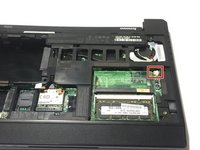
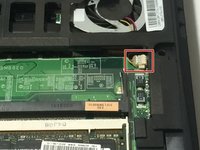
    • Using the magnetic screwdriver fit with a PH0 bit, unscrew the two screws shown in the picture.

    FixBotに聞いてみる
    コメントを追加

  6. Lenovo ThinkPad X100e Fan Replacement: 手順 6、 1の画像 1
    • Disconnect the two wired ribbons by pulling up the little black tabs, then pull the wires out.

    FixBotに聞いてみる

    コメントを追加

  7. Lenovo ThinkPad X100e Fan Replacement: 手順 7、 1の画像 1
    • Disconnect the little black wire by simply pulling it out.

    FixBotに聞いてみる

    コメントを追加

  8. Lenovo ThinkPad X100e Fan Replacement: 手順 8、 1の画像 1
    • Using the spudger, go beneath the frame to pry the frame off the device.

    • The best place to start from is the bottom, near the trackpad.

    • Place the frame aside once this step is completed.

    FixBotに聞いてみる

    コメントを追加

  9. Lenovo ThinkPad X100e Fan Replacement: 手順 9、 1の画像 1
    • Using the magnetic screwdriver, unscrew all 8 screws shown.

    • Be sure to place all your screws on the magnetic mat.

    FixBotに聞いてみる

    コメントを追加

  10. Lenovo ThinkPad X100e Fan Replacement: 手順 10、 1の画像 1
    • Disconnect the three wired ribbons on the top left side of the panel.

    FixBotに聞いてみる

    コメントを追加

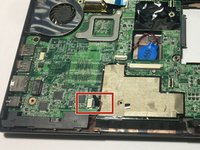
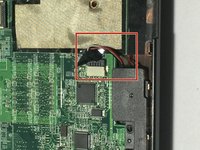
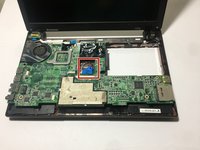
  11. Lenovo ThinkPad X100e Fan Replacement: 手順 11、 2の画像 1 Lenovo ThinkPad X100e Fan Replacement: 手順 11、 2の画像 2
    • Disconnect the wired plug, then close the device and flip it over.

    FixBotに聞いてみる

    コメントを追加

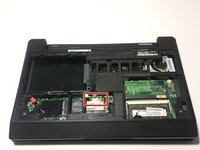
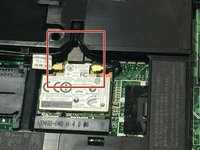
  12. Lenovo ThinkPad X100e Fan Replacement: 手順 12、 2の画像 1 Lenovo ThinkPad X100e Fan Replacement: 手順 12、 2の画像 2
    • Simply pull the two plugs up and out to disconnect the wires.

    FixBotに聞いてみる

    コメントを追加

  13. Lenovo ThinkPad X100e Fan Replacement: 手順 13、 1の画像 1
    • Flip the device back over to untape the two black wires located at the bottom left corner of the device.

    FixBotに聞いてみる

    コメントを追加

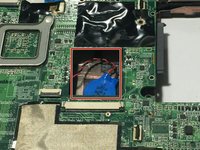
  14. Lenovo ThinkPad X100e Fan Replacement: 手順 14、 2の画像 1 Lenovo ThinkPad X100e Fan Replacement: 手順 14、 2の画像 2
    • Simply disconnect the blue connector at the center of the device.

    FixBotに聞いてみる

    コメントを追加

  15. Lenovo ThinkPad X100e Fan Replacement: 手順 15、 1の画像 1
    • Using your fingers, slowly push the panel out of the plastic body.

    • Place the plastic body aside once the panel is free.

    FixBotに聞いてみる

    コメントを追加

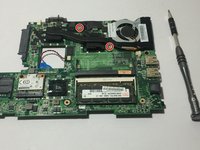
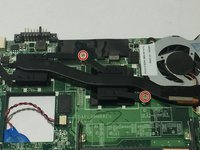
  16. Lenovo ThinkPad X100e Fan Replacement: 手順 16、 2の画像 1 Lenovo ThinkPad X100e Fan Replacement: 手順 16、 2の画像 2
    • Using the same magnetic screwdriver, unscrew the two screws as shown in the picture.

    FixBotに聞いてみる

    コメントを追加

  17. Lenovo ThinkPad X100e Fan Replacement: 手順 17、 2の画像 1 Lenovo ThinkPad X100e Fan Replacement: 手順 17、 2の画像 2
    • Disconnect the plug right below the Fan. A pair of pliers might be useful during this step.

    • If you need to clean your cooling fan, simply spray compressed air onto the fan to clean in and rid it of debris. Repeat the previous steps in reverse order to put your laptop back together.

    • If you need to replace your cooling fan, simply place your new fan in, and follow the steps in reverse order to put your device back together.

    FixBotに聞いてみる

    コメントを追加

終わりに

Then you are good to go.

キャンセル: このガイドを終了できませんでした。

3 の人々がこのガイドを完成させました。

作成者

3人の作成者と共同で作成されました。

Claire Hall

メンバー登録日: 02/08/18

304 ポイント

1ガイドが承認済み

チーム

University of North Texas, Team S2-G2, Thomas Spring 2018 University of North Texas, Team S2-G2, Thomas Spring 2018人のメンバー

UNT-THOMAS-S18S2G2

3 メンバー

3のガイドは作成済み

0件のガイドコメント

コメントを追加

統計データ:

過去 24時間: 0

過去 7 日: 9

過去 30 日: 28

今までの合計 1,644