メインコンテンツにスキップ
リペアコミュニティに参加 - アカウントの作成

Jabra CRUISER2 Status Display Replacement

必要な工具と部品

    1. Jabra CRUISER2 Status Display Replacement, Front Plate: 手順 1、 1の画像 1
      • Use the iOpener tool to unglue the adhesive of the device. The link to the iOpener instructions are listed below.

      • iOpenerの使用方法

      FixBotに聞いてみる

      コメントを追加

    2. Jabra CRUISER2 Status Display Replacement: 手順 2、 1の画像 1
      • Place the flat head of the bigger plastic opening tool in between the front plate and back plate.

      • Pull the tool toward the back of the device to pry it open.

      • Repeat this process over all edges of the device.

      FixBotに聞いてみる

      コメントを追加

    3. Jabra CRUISER2 Status Display Replacement: 手順 3、 1の画像 1
      • Open up the device by pulling the front plate straight up from the back plate.

      FixBotに聞いてみる

      コメントを追加

    1. Jabra CRUISER2 Status Display Replacement, Motherboard: 手順 4、 2の画像 1 Jabra CRUISER2 Status Display Replacement, Motherboard: 手順 4、 2の画像 2
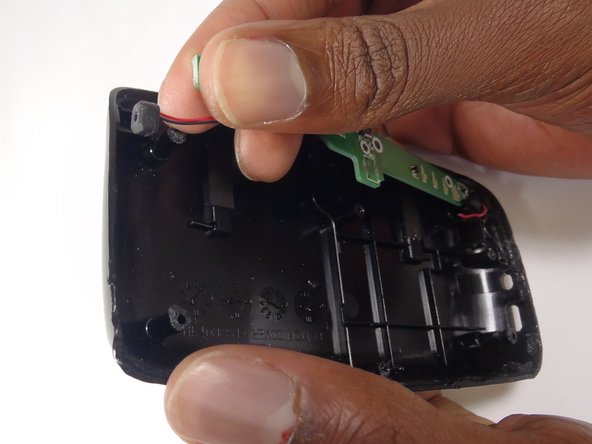
      • Carefully detach the wire running from the speaker to the motherboard by unplugging it from the white socket.

      FixBotに聞いてみる

      コメントを追加

    2. Jabra CRUISER2 Status Display Replacement: 手順 5、 1の画像 1
      • Using the PH000, unscrew the three 4.55 mm screws in the motherboard.

      • The names of the screwdriver heads are listed on the sides of each head.

      FixBotに聞いてみる

      コメントを追加

    3. Jabra CRUISER2 Status Display Replacement: 手順 6、 1の画像 1
      • Remove the motherboard from the device by lifting it up from the back plate.

      FixBotに聞いてみる

      コメントを追加

    1. Jabra CRUISER2 Status Display Replacement, Status Display: 手順 7、 1の画像 1
      • Using the PH000, unscrew the three 4.6mm screws in the status display.

      FixBotに聞いてみる

      コメントを追加

    2. Jabra CRUISER2 Status Display Replacement: 手順 8、 2の画像 1 Jabra CRUISER2 Status Display Replacement: 手順 8、 2の画像 2
      • Disconnect the wires connecting the status display to the back plate. Do this by pulling the wire from the black socket.

      • Do this with the wires on both sides of the status board.

      FixBotに聞いてみる

      コメントを追加

    3. Jabra CRUISER2 Status Display Replacement: 手順 9、 1の画像 1
      • Remove the status display by lifting it off of the back plate.

      FixBotに聞いてみる

      コメントを追加

終わりに

To reassemble your device, follow these instructions in reverse order.

キャンセル: このガイドを終了できませんでした。

ある他の人がこのガイドを完成しました。

作成者

3人の作成者と共同で作成されました。

Spartacus

メンバー登録日: 10/17/14

636 ポイント

5のガイドは作成済み

チーム

Baylor, Team 8-13, Williams Fall 2014 Baylor, Team 8-13, Williams Fall 2014人のメンバー

BU-WILLIAMS-F14S8G13

3 メンバー

15のガイドは作成済み

0件のガイドコメント

コメントを追加

統計データ:

過去 24時間: 0

過去 7 日: 2

過去 30 日: 12

今までの合計 672