はじめに
Use this guide to replace the battery in your Huawei P8 smartphone.
必要な工具と部品
-
-
First switch off your phone.
-
Remove the trays for the SD card and the SIM card.
 FixBotに聞いてみる
-
-
-
Remove the two Torx T2 screws located at the bottom next to the device's Micro USB port.
-
-
-
Use an iSclack or a suction handle to separate the display unit from the rear panel.
-
-
-
Remove the two Phillips #00 screws that secure the front camera and display/battery connector brackets
-
-
-
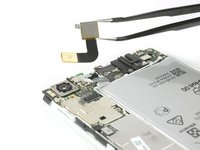
Use a tweezer to remove the bracket covering the display and the battery flex connector.
-
Unplug the battery flex connector with a Spudger.
-
Remove the bracket covering the flex connector of the front camera.
-
-
-
-
Unplug the headphone jack and the front camera flex connectors.
-
Remove the front camera.
-
-
-
Use a spudger to disconnect the power/volume cable and fold it out of the way.
-
Remove the liquid contact indicator.
-
-
-
Remove the five Phillips #00 screws that hold down the motherboard of your Huawei P8.
-
-
-
Unplug the display flex connector from the main board with a Spudger.
-
Disconnect and remove the antenna cable with a tweezer.
-
-
-
Carefully peel up the flex cable of your loudspeaker.
-
If the cable is difficult to peel, heat the loudspeaker assembly with an iOpener or a heat gun.
-
Lift up the loudspeaker assembly with a spudger and remove it.
-
-
-
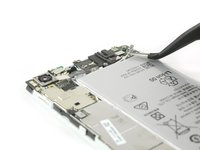
Free the end of the first adhesive pull tab to get a good grip on it.
-
Pull the adhesive tab in a slow constant movement to free the battery.
-
-
-
Free the end of the second adhesive pull tab.
-
Pull the adhesive tab in a slow constant movement.
-






To reassemble your device, follow these instructions in reverse order.
18 の人々がこのガイドを完成させました。

チーム

9件のガイドコメント
Really helpful guide. Only hiccup was that on my handset the screws holding the casing together (Step 2) were Torx 2 rather than pentalobe, possibly a regional variation. I opted not to remove the loudspeaker (Step 10) as the ribbon cable was firmly stuck down and I worried it would break. This meant I could only cleanly remove the adhesive pad in line with the charging port. I was able to prise out the battery using spudger and screwdriver to scrape the other pad from the phone body. All now reassembled and working properly!
Ben Raphael - 返信 共有
Overall a very helpful guide . I also had torx screws in mine . The torx screws are tiny , so make sure you have the right screwdriver before starting . We didn’t bother removing the loudspeader assembly either (Step 10) . You can just prise up the ribbon cable (carefully) . Add heat if necessary . Now to the biggest problem . Removing the old battery from the phone . What a nightmare ! It’s really stuck down .We took our time using a hairdryer (no heat gun) , and a flat head screwdriver , and went from one end to the other prising it off gently . It still took about 20 minutes . Saying that . Don’t rush it , as it’s the final stage . Also . If you do use a flat head screwdriver then don’t twist it , as you might damage the casing . Just slide it underneath it applying heat . Total time to remove the old battery was 90 minutes , but about 50 of those were spent just getting the first 2 screws out . 20 minutes to put the new battery in and reassemble . Make sure all flex connectors are properly reseated .
My P8 battery has completely died on me. I cannot believe that to replace a battery, we have to now go to these lengths to do it. There must be a mountain of mobile phones, where the only issue with them is a flat battery. Surely, this cannot be allowed to continue. I know why the manufacturers want to make it hard to simply replace a battery, because it sells more mobile phones. But think of all that wasted technology, where a phone may have lasted just over a 24 month contract before the battery is done.
joeninetee - 返信 共有
Many thanks for this tutorial. Together we shall beat them!
joeninetee - 返信 共有
Thank you for a very nice and easy to follow tutorial!
I have now replaced my battery with what should be an original battery for the Huawei Ascend P8, battery nr: HB3447A9EBW. For some reason the width of the new battery is a few millimeters smaller than the old one, meaning that it does not fill out the space completely. Has anyone else experienced the same?
After having assembled the phone again I experience some weird issues with the battery level dropping from 50%, 60%, 70% or even 100% in an instant. I have tried calibrating the battery by, letting it die completely, recharge it to 100% let it drain completely again and recharge. I have tried different battery calibration apps and a factory reset - nothing helps.
I contacted the company I bought the battery from and got a replacement - still same issue.
Unfortunately i damaged the original battery when taking it out, so i cant use that as a reference.
Any suggestions would be most appreciated!
