メインコンテンツにスキップ
リペアコミュニティに参加 - アカウントの作成

Ematic EGQ307 Battery Replacement

必要な工具と部品

  1. Ematic EGQ307 Battery Replacement, Battery: 手順 1、 2の画像 1 Ematic EGQ307 Battery Replacement, Battery: 手順 1、 2の画像 2
    • There are two screws on the side with the micro USB power port. Remove the two 2mm x 0.5mm screws with a Phillips #0 Screwdriver head.

    FixBotに聞いてみる

    コメントを追加

  2. Ematic EGQ307 Battery Replacement: 手順 2、 2の画像 1 Ematic EGQ307 Battery Replacement: 手順 2、 2の画像 2
    • Pry off the plastic backing with the spudger and the plastic opening tools. Anything that can provide enough leverage and not conduct electricity will also work for this purpose.

    • Carefully separate the front and back plates because the wire that connects the speaker is connected to both the front and back plates.

    FixBotに聞いてみる

    コメントを追加

  3. Ematic EGQ307 Battery Replacement: 手順 3、 1の画像 1
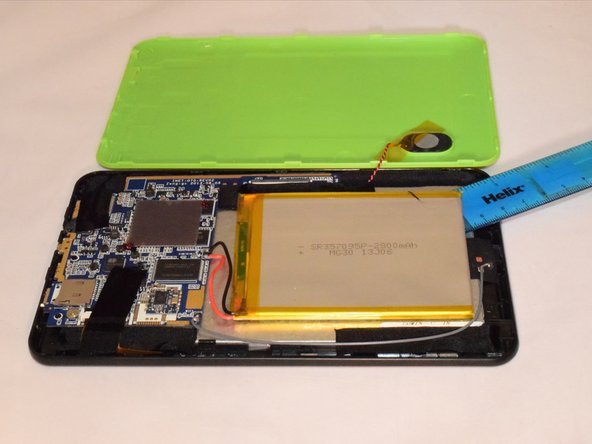
    • 3. Once you pry off the plastic backing, you will expose the battery.

    • Carefully separate the front and back plates because the wire that connects the speaker is connected to both the front and back plates

    FixBotに聞いてみる

    コメントを追加

  4. Ematic EGQ307 Battery Replacement: 手順 4、 3の画像 1 Ematic EGQ307 Battery Replacement: 手順 4、 3の画像 2 Ematic EGQ307 Battery Replacement: 手順 4、 3の画像 3
    この手順で使用する道具:
    Plastic Cards
    $2.99
    • 4. Remove the tape holding the battery to the plastic frame. The battery is glued to the back of the LED. Pry the battery off the LED using a plastic card.

    • Do not bend or warp the battery. Even though the battery may not be working, it is still dangerous.

    FixBotに聞いてみる

    コメントを追加

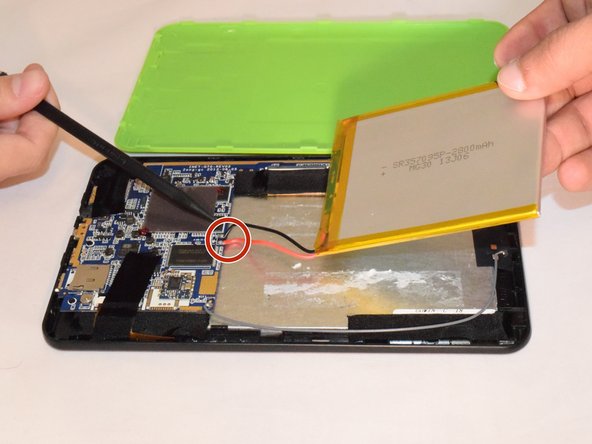
  5. Ematic EGQ307 Battery Replacement: 手順 5、 1の画像 1
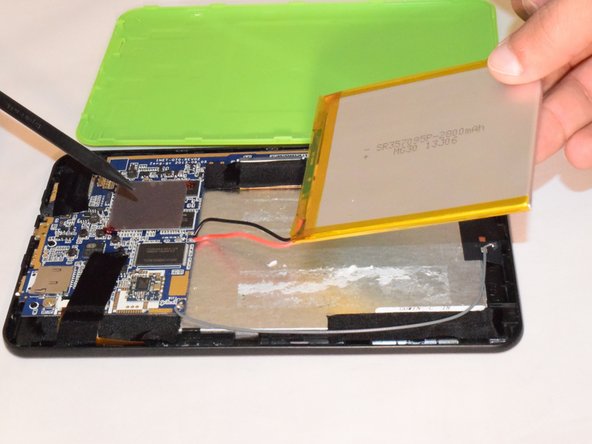
    • If replacing the battery, unplug the black and red wires gently from the hardware and take off the battery .

    • If not replacing it, do not disconnect the red and black wires.

    • If replacing the battery, you will need a soldering kit to reconnect the wires with the new battery after disconnecting the old battery.

    • How To Solder and Desolder Connections.

    FixBotに聞いてみる

    コメントを追加

終わりに

To reassemble your device, follow these instructions in reverse order. Note, you need to solder the battery wires onto the motherboard.

キャンセル: このガイドを終了できませんでした。

2 の人々がこのガイドを完成させました。

作成者

5人の作成者と共同で作成されました。

Othman

メンバー登録日: 07/21/15

267 ポイント

1ガイドが承認済み

チーム

Eastern Washington University, Team 1-1, Rowley SU 2015 Eastern Washington University, Team 1-1, Rowley SU 2015人のメンバー

EWU-ROWLEY-SU15S1G1

4 メンバー

10のガイドは作成済み

0件のガイドコメント

コメントを追加

統計データ:

過去 24時間: 1

過去 7 日: 6

過去 30 日: 33

今までの合計 5,489