メインコンテンツにスキップ
リペアコミュニティに参加 - アカウントの作成

Dell Inspiron 8600 RAM Replacement

必要な工具と部品

    1. Dell Inspiron 8600 RAM Replacement, Battery: 手順 1、 1の画像 1
      • Remove the battery from the bottom left of the laptop as shown.

      • Remove the battery before operating on the computer to avoid electrocution.

      FixBotに聞いてみる

      コメントを追加

    1. Dell Inspiron 8600 RAM Replacement, RAM: 手順 2、 1の画像 1
      FixBotに聞いてみる

      コメントを追加

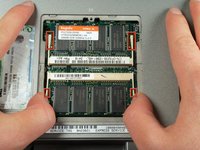
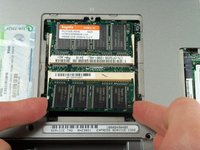
    2. Dell Inspiron 8600 RAM Replacement: 手順 3、 2の画像 1 Dell Inspiron 8600 RAM Replacement: 手順 3、 2の画像 2
      • Pull apart the white plastic tabs on either side of the RAM which will cause it to rise upwards.

      • Gently remove the RAM, only touching the edges of the component.

      FixBotに聞いてみる

      コメントを追加

終わりに

To reassemble your device, follow these instructions in reverse order.

キャンセル: このガイドを終了できませんでした。

3 の人々がこのガイドを完成させました。

作成者

5人の作成者と共同で作成されました。

Brian Murphy

メンバー登録日: 04/13/11

368 ポイント

4のガイドは作成済み

チーム

Cal Poly, Team 18-22, Garner Spring 2011 Cal Poly, Team 18-22, Garner Spring 2011人のメンバー

CPSU-GARNER-S11S18G22

4 メンバー

16のガイドは作成済み

0件のガイドコメント

コメントを追加

統計データ:

過去 24時間: 2

過去 7 日: 9

過去 30 日: 33

今までの合計 5,083