はじめに
The hard drive is where a computer permanently stores information, making it very important. A broken or damaged hard drive must be replaced to restore proper functioning.
必要な工具と部品
-
-
Turn the laptop upside-down and remove the following screws using a Phillips #0 driver:
-
Two 9.5 mm screws in the middle of the back edge, and one 9.5 mm screw in the right edge
-
Two 4.3 mm screws in the back corners
-
One 17.5 mm screw at the left edge near the optical drive
-
Three 4.3 mm screws in the front edge
 FixBotに聞いてみる
-
-
-
Use the plastic opening tool to separate the keyboard plate cover from the bottom cover. In order to do this, insert the plastic opening tool in between the keyboard plate cover and the bottom cover, then slide along edges to pry open.
-
-
-
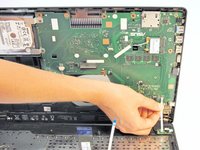
Locate the three ribbons connecting the keyboard plate cover to the bottom cover.
-
-
-
-
Invert the laptop in order to gain access to the ribbons.
-
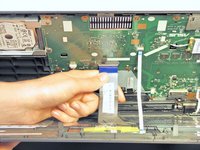
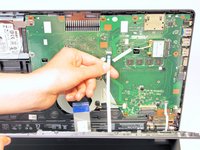
Remove each ribbon by flipping the small white plastic flap up and gently pulling on the ribbon.
-
-
-
Now that the ribbons have been detached from the bottom cover, carefully remove the keyboard plate cover. Once it has been removed, place it in a safe and moisture free area so it does not get damaged.
-
-
-
Unscrew the three 5.5 mm Phillips #0 screws with the Phillips #0 Screwdriver.
-
-
-
Once the screws have been removed, place your fingers on the left corners and push the hard drive towards the right edge of the laptop (relative to the picture).
-




To reassemble your device, follow these instructions in reverse order.
48 の人々がこのガイドを完成させました。

チーム

Cal Poly, Team 7-22, Regan Spring 2014 Cal Poly, Team 7-22, Regan Spring 2014人のメンバー
CPSU-REGAN-S14S7G22
5 メンバー
15のガイドは作成済み
8件のガイドコメント
Excellent work !
Same issue as Tony on 09/03/2014
The screw sizings are mixed up. The red screws are 9.5, not 14.3
The yellow screws are 14.3 not 9.5. Please fix the repair guide text
Mevlan Coma - 返信 共有
It should be fixed now! Thanks to both of you for the tip. By the way, you can always edit the text yourself. ;)
Thanks for the info!
Abe Aleman - 返信 共有
