メインコンテンツにスキップ
リペアコミュニティに参加 - アカウントの作成

Astro A50 2016 Headset Battery Replacement

必要な工具と部品

  1. Astro A50 2016  Headset Battery Replacement, Headset Speakers: 手順 1、 2の画像 1 Astro A50 2016  Headset Battery Replacement, Headset Speakers: 手順 1、 2の画像 2
    • Remove the magnetic ear pads by gently pulling them away from the headset. Be careful not to remove the left earpad, which houses the microphone, and ensure you're only removing the right earpad.

    FixBotに聞いてみる

    コメントを追加

  2. Astro A50 2016  Headset Battery Replacement: 手順 2、 1の画像 1
    • Squeeze the plastic opening tool between the black plastic and foam pad on non mic side and then pry upwards to remove the felt pads covering the speaker.

    FixBotに聞いてみる

    コメントを追加

  3. Astro A50 2016  Headset Battery Replacement: 手順 3、 1の画像 1
    • Remove the four 6mm Phillips 1 screws.

    FixBotに聞いてみる

    コメントを追加

  4. Astro A50 2016  Headset Battery Replacement: 手順 4、 1の画像 1
    • Lift the speaker module up off the device.

    FixBotに聞いてみる

    コメントを追加

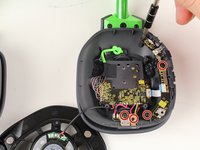
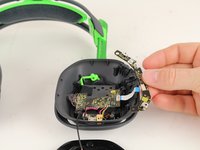
  5. Astro A50 2016  Headset Battery Replacement, Headset Battery: 手順 5、 2の画像 1 Astro A50 2016  Headset Battery Replacement, Headset Battery: 手順 5、 2の画像 2
    • Remove the five 6mm PH1 screws.

    • Remove the buttons panel by pulling the panel away from the white ribbon cord.

    FixBotに聞いてみる

    コメントを追加

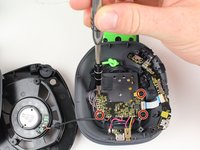
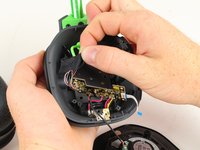
  6. Astro A50 2016  Headset Battery Replacement: 手順 6、 2の画像 1 Astro A50 2016  Headset Battery Replacement: 手順 6、 2の画像 2
    • Remove the four 6mm PH1 screws.

    • Remove the tape holding the wires connected to the motherboard.

    FixBotに聞いてみる

    コメントを追加

  7. Astro A50 2016  Headset Battery Replacement: 手順 7、 1の画像 1
    • Remove the back panel by squeezing the two tabs together and pushing out.

    FixBotに聞いてみる

    コメントを追加

  8. Astro A50 2016  Headset Battery Replacement: 手順 8、 1の画像 1
    FixBotに聞いてみる

    コメントを追加

  9. Astro A50 2016  Headset Battery Replacement: 手順 9、 1の画像 1
    • Remove the battery by using the plastic opening tool to pry it away from the headset.

    FixBotに聞いてみる

    コメントを追加

終わりに

To reassemble your device, follow these instructions in reverse order.

キャンセル: このガイドを終了できませんでした。

14 の人々がこのガイドを完成させました。

作成者

3人の作成者と共同で作成されました。

Andrew Monson

メンバー登録日: 10/02/17

505 ポイント

1ガイドが承認済み

チーム

Cal Poly, Team S15-G1, Livingston Fall 2017 Cal Poly, Team S15-G1, Livingston Fall 2017人のメンバー

CPSU-LIVINGSTON-F17S15G1

3 メンバー

13のガイドは作成済み

15件のガイドコメント

Is this for the Gen III Astro a50?

vic.bianco - 返信 共有

Yes it’s for the Gen 3 A50

Crisdavid - 返信 共有

Where do I buy a battery though….

Brandon Phillips - 返信 共有

how can I connect the new battery ?

Ahmed f - 返信 共有

コメントを追加

統計データ:

過去 24時間: 6

過去 7 日: 78

過去 30 日: 262

今までの合計 31,888