
プリンターカートリッジ
この翻訳は機械によって生成されたものであり、人間による校正は行われていません。母国語は日本語ですか? 翻訳を校正する。
|
1 件の回答 0 スコア |
How do I put the ink cartridge in the printer |
|
2件の回答 2 スコア |
It will not feed and making loud sound |
|
1 件の回答 0 スコア |
Canon BJC-85 Broken belt |
以前、このデバイスの修理に使われていた一般的な工具です。修理過程において全部の工具が必要とは限りません。
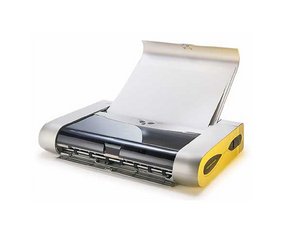
高性能かつコンパクトなi80 Bubble Jetプリンターは、IrDA対応およびオプションのBluetoothインターフェースによるワイヤレス動作が可能で、一般的な携帯端末からのワイヤレス伝送を受信できます。最大限の携帯性を確保するため、Canonはカーアダプターや外出先での電源供給が可能なバッテリーキットなど、いくつかのオプションアクセサリーを開発しました。
本製品は製造を終了しています。
i80 Bubble Jetは、プリンター上部(蓋の内側)に印刷されたブランド、モデル名、番号で識別できます。9桁の英数字のシリアル番号は、デバイスの背面、側面、または内部のラベルに印刷されています。プリンターの識別に関する詳細については、Canonサポートページをご確認ください。
プリンタータイプ: ドットマトリクスおよびカラーインクジェット
最大用紙サイズ 封筒 - US # 10 - Com10 (4.125インチ x 9.5インチ)
シート - 4インチ x 6インチ
シート - 5インチ x 7インチ
シート - US Legal (8.5インチ x 14インチ)
シート - US Letter (8.5インチ x 11インチ)
標準トレイの最大給紙枚数: 30枚
対応プリンター言語: ESC/P2
高さ: 2インチ
幅: 12.4インチ
奥行き: 6.9インチ
重量: 4ポンド(約1.8 kg)
モノクロ印刷速度: 14 ppm
カラー印刷速度: 10 ppm
モノクロ水平光学解像度: 600 dpi
モノクロ垂直光学解像度: 600 dpi
カラー垂直光学解像度: 1200 dpi
カラー水平光学解像度: 4800 dpi
JMU-ALLEN-F11S2G3
2 メンバー
12のガイドは作成済み
過去 24時間: 1
過去 7 日: 14
過去 30 日: 55
今までの合計 10,286



