
メインコンテンツにスキップ
リペアコミュニティに参加 - アカウントの作成

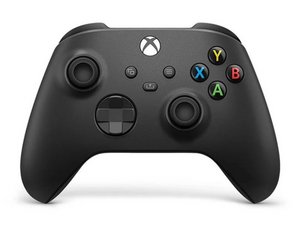
クラシック Xbox ワイヤレス コントローラーの 3 番目のリビジョンは、Xbox Series X および Series S にバンドルされて 2020 年 11 月にリリースされました。このコントローラーは、以前の Xbox One コンソールおよび PC と下位互換性があります。

Help, my controller doesn't stay connected wired

My Xbox Series X controller (Model #1914) seems to have a loose usb c connection since whenever I connect it via a wire it ends up disconnecting a lot. However, when I manage to get it charged (again cuz of the poor wired connection) and connect it to my pc via Bluetooth it works flawlessly.

How could I reasonably fix this issue without soldering if possible?

回答がありました! 回答を表示 同じ問題があります

この質問は役に立ちましたか?

スコア 0
コメントを追加

1 件の回答

ベストアンサー

Hi!

Just asking (probably you already tried it): Did you tried another USB-C cable? Would do that first.

If yes and the issue continues, it's most likely the USB-C port... The downside is, that it need to be replaced and this requires soldering...

You could replace the board completely, but this will be more expensive.

Otherwise I advise to contact a local repair shop to do it for you.

Please let us know how it goes!

このアンサーは役に立ちましたか?

スコア 1

2 件のコメント:

Hello! quick update, ive tried it again but now the controller itself refuses to hold a charge (using the xbox plug and play kit) but stays connected wired sometimes

update on my update i pulled up the positive and negative terminals to tighten the connection up and it now holds a charge and when i used a new cable it seems to have made it work?? although it could be a fluke since ive tried multiple cables before.

ill probably just replace the entire board with the usb c connection anyways by buying a used controller.

さんによる

That is a good option as well!

Replace the board from the replacement controller. It could be battery pins related.. but those are also installed on the same board.

Please let us know how it goes :)!

さんによる

コメントを追加

回答を追加する

saviourr さん、ありがとうございました!
統計データ:

過去 24時間: 0

過去 7 日: 12

過去 30 日: 63

今までの合計 63