

My phone speaker is not working
To answer calles I have to use loudspeaker mode
評価: 861.1千
 1.5千
1.5千
 978
978
 2.4千
2.4千
@ejob start off by checking your speaker in Safe mode to rule out that some third party App is blocking the sound. To enter Safe Mode on a Tecno Spark 7, power down the phone, then turn it on and press and hold the volume down button until the phone boots up. Now test your speaker and see if it works. IF so, you will have to remove your third party Apps until you find the one that is causing this. To exit Safe Mode, simply restart your phone normally.
If even in safe mode your speaker still does not work you may have to replace it. Since iFixit does not yet have a dedicated guide for this, use the speaker is on the top by the main board.
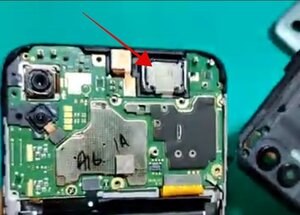
Since iFixit does not yet have a specific guide for that, use something like this video to replace it.
While you work on your phone, take lots of pictures. Once you are done with it, take those pictures and create a guide for iFixit. That will help the next person that has a device with the same issues as you do. It's easy and fun to create these guides. https://ifixit.com/Guide/new The iFixit community will appreciate this.
Repair is War on Entropy!
このアンサーは役に立ちましたか?
過去 24時間: 2
過去 7 日: 12
過去 30 日: 56
今までの合計 435


Yes it is as you said boss
ejob さんによる