メインコンテンツにスキップ
リペアコミュニティに参加 - アカウントの作成

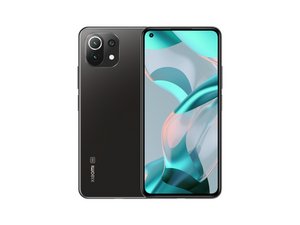
Xiaomi Mi 11 Lite 5G NEは、2021年9月に発売されたXiaomi製のミドルレンジスマートフォンです。6.55インチのAMOLEDディスプレイ、64MPのメインカメラ、側面指紋センサー、4250mAhのバッテリーを搭載し、Snapdragon 778Gで動作します。

How to reconnect screen cable

My xiaomi 11 lite 5g ne sometimes the screen went black and showed green vertical lines. When I pressed near the front camera, the screen worked again normally with no issues in touch or colors.

But after the last time my phone fell, the screen turned off completely. I tried pressing the same spot (this time with more force), and the screen worked again for about 2 minutes, then went black permanently. Now it doesn’t respond no matter how much I press.

Could this mean the display cable got disconnected? If yes, how can I fix this problem?

回答がありました! 回答を表示 同じ問題があります

この質問は役に立ちましたか?

スコア 0
コメントを追加

1 件の回答

ベストアンサー

This sounds like a problem with the delicate connections between the glass that the display circuits are printed on and the flex cable leading to the motherboard. Unfortunately, those connections are not considered repairable (at least, not without equipment costing several thousand dollars), so the only real solution is to replace the screen.

This guide shows how to replace the screen+frame assembly on your phone.

Manuales / Xiaomi Mi 11 Lite 5G / Fullscreen - Nadie Me Llama Gallina

このアンサーは役に立ちましたか?

スコア 2
コメントを追加

回答を追加する

unknown account さん、ありがとうございました!
統計データ:

過去 24時間: 2

過去 7 日: 14

過去 30 日: 45

今までの合計 321