メインコンテンツにスキップ
リペアコミュニティに参加 - アカウントの作成

2015年3月にアップデートされたAppleのMacBook Pro 13" Retina Display Early 2015 はモデル番号はA1502、第5世代のIntel Core i5と i7プロセッサーが特長でForce Touchトラックパッドを備えています。

Incompatible screen for different A1502 models?

Hello,

I bought a late 2013 A1502 to change the screen of my early 2015 A1502, but now I see that the lid sensor doesn't work properly : the screen is off on boot, and only lights on if I close the lid.

Would someone be familiar with that kind of problem, and know if there is a way to make it work anyway? Thanks!

この質問に回答する 同じ問題があります

この質問は役に立ちましたか?

スコア 0
コメントを追加

2件の回答

This is one of the risks of not using the proper part. Apple doesn't make ID'ing the system easy as the A# is not enough you need the year and some times even the sub ID value.

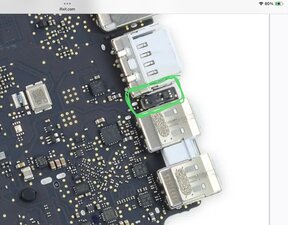
To fix this will require peeling the LCD panel out of the lid frame to then move the magnet into the correct placement to hit the Hall sensor held on the logic board if that's even possible.

Here's the location of the Hall sensor

Block Image

The risk of damaging the LCD panel is the gamble and I'm not sure the frame offers the needed cavity to move the magnet to meet the newer systems need. While not the same system here's a deep dive into the display assembly of a retina system so you can see this is not an easy task MacBook Pro Retina Display Teardown.

I'm sorry to give you the bad news. I wish I had a better one as these displays are still way to expensive even used!

このアンサーは役に立ちましたか?

スコア 0

4 件のコメント:

Hi, thanks for the input. I continued my search and I don't think that's the reason. If I use a magnet instead of closing the lid, it's the same thing (screen lights on when I put the magnet). I've found somewhere on reddit that the 2015 model didn't use the same video encoding, that the screen is taken as an external monitor, which would explain why it lights on when I close it (?) So maybe nothing to do with the sensor

さんによる

@alsteingilbert - The displays backlight is controlled by the Hall sensor. Yes the display's interface spec was also changed here as well from iDP to eDP and that will explain the lack of image.

In either case not a workable display

さんによる

So I have no idea how it is working but it is.

In the end I have a my A1502 2013 screen on a A1502 2015 body.

At boot the screen is black, I have to close the lid / pass a magnet once, and after that everything works just fine. Just hoping it will hold.

If you happen to have an idea to not have the display black on startup I'm interested ^^

EDIT : My mistake, it works fine when charging, when not charging, if I close the lid, display starts to dim then go back on, can't shut it down when not charging...

さんによる

@alsteingilbert - That's the Hall Sensor issue

さんによる

コメントを追加

Late 2012 > 2014 A1502 Models LCD's are 'different' to the 'unique' 2015 models LCD. 3.0 > 3.1 something.

Check the link for a MacBook screen compatibility list.

All Retina screen cables with hinges are compatible.

A1425 2012L 13" Retina could be tested with 13" or 15" 2013E Display. ⏎
Unfortunately, 2013/13" Display has different Camera connector.
For testing 13 and 15 inch screens of the same generation are compatible
2012-E2013 are fully compatible
L2013-2014 are fully compatible
2015 is unique

このアンサーは役に立ちましたか?

スコア 0
コメントを追加

回答を追加する

Alstein Gilbert さん、ありがとうございました!
統計データ:

過去 24時間: 1

過去 7 日: 9

過去 30 日: 40

今までの合計 214