修理ガイド
手順毎の修理ガイドを使って、何にでも修理できる方法を学ぶ
アプリ
あなたの便利なリペアヘルパー。
FixBot
フレンドリーなAIリペアアシスタント。
リペアビリティ
修理できる製品がなぜ良いのでしょうか
分解
最新ガジェットの内側を覗いてみる
アンサーフォーラム
解決方法を共有して、友人に助けてもらう
自分に合うコミュニティを見つける
チーム、イベント、フィクサー仲間を探す。
ヘルプ・アウト
修理の知識を誰でも無料で利用できるようにする。
修理する権利
修理する権利のムーブメントやこの支持者になる方法を知る。
おすすめ
高品質のパーツとツールには、iFixitの生涯保証が付けられています。
ツール
精密ツールの厳選セレクションを見る
パーツ
iFixitの品質基準を満たしたパーツを購入する
iPhoneバッテリー
バッテリーは検査済みで保証付き、必要なすべてが揃ったキット。
2022年12月発売。Intel Core i5 11400H、GTX 1660、RTX 2080、またはRTX 3050 Tiを搭載したノートパソコンです。512 GBのストレージ、16 GBの交換可能なDDR4メモリ、第2のM.2 NVMeスロットを備えています。144 Hzの1080p画面、RGBキーボード、DTS対応のHQスピーカー2基を搭載しています。
Gaming Brothers @gamingbrothers
評価: 13
1
投稿日: 2025年7月25日
I Plug my ethernet cable to laptop and it doesnt show the ethernet icon, so it doesnt work
この質問は役に立ちましたか?
1件のコメント:
Hi! What does device manager tells you on the laptop? Any question or exclamation marks? Is the ethernet driver up to date? Did you tried a new re-install?
koppie007 さんによる2025年7月25日
Umar Sarwar @umarsarwar
評価: 1
=== ***Quick Troubleshooting Steps
F2
DEL
このアンサーは役に立ちましたか?
過去 24時間: 0
過去 7 日: 7
過去 30 日: 28
今までの合計 442


 1
1 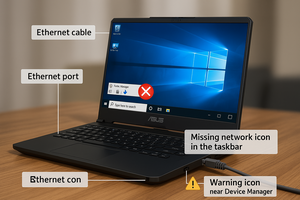


Hi! What does device manager tells you on the laptop? Any question or exclamation marks? Is the ethernet driver up to date? Did you tried a new re-install?
koppie007 さんによる