

Where is the write protect screw?
Does anybody know which screw is the write protect?

この質問は役に立ちましたか?
スコア
0
評価: 283
 11
11
 6
6
 4
4
Does anybody know which screw is the write protect?
この質問は役に立ちましたか?
評価: 283
11
6
4
I was able to figure this out. It is a PAINE/AURON_PAINE model board, and the screw is located here:
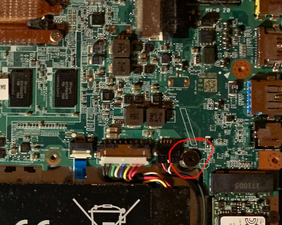
You simply have to remove the bottom cover, and the screw is accessible.
このアンサーは役に立ちましたか?
評価: 106.1千
463
356
191
The newer "CR-49" Chromebooks use an NVRAM "write protect" flag, not a physical flag. You have to be able to boot it into dev mode (blocked by any competent sysadmin on managed ones), and then you need to go into the terminal. MrChromeboox has instructions for most of them. Others are the same, but you boot it into developer mode and run the shell command, then:
flashrom --wp-disable
This is the only way on Chromebooks newer than the CR-48. Google learned a lot of lessons from the ARM CR-48 series being easily hacked by script kiddies to remove MDM from them illegitimately.
このアンサーは役に立ちましたか?
Thank you for your help! This was actually a very old model that still used a screw, which I was able to locate. And I did happen to follow MrChromebox's tutorial.
過去 24時間: 8
過去 7 日: 44
過去 30 日: 193
今までの合計 3,277


6 件のコメント
What model is this Chromebook? Write protect screws haven't been used on Chromebooks in quite some time. There may be different mechanisms available now, but without the model information there's no way to tell.
Jerry Wheeler さんによる
@dadibrokeit I found it with some reference images. Yeah, it’s a pretty old model. Thank you!
Preston Tech さんによる
@prestontech For the benefit of anyone who comes after you with the same problem, can you add what information you found? In particular, you could edit your question to add a marker to your picture pointing to the correct screw. The model number would help others to tell if this is the same as theirs too.
Jerry Wheeler さんによる
@dadibrokeit AND I just seen this :-(. Whatever, my answer is probably still helpful for the NVRAM type. If it has no WP screw, it's a CR-49.
Nick さんによる
@dadibrokeit Sure, I’ll post an answer.
Preston Tech さんによる
1以上のコメントを表示