
メインコンテンツにスキップ
リペアコミュニティに参加 - アカウントの作成

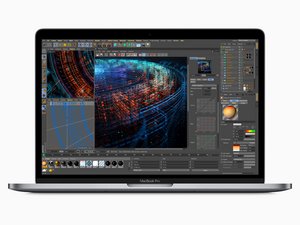
2018年7月に発売された15インチMacBook Proです。モデル番号はA1989です。15.4インチ LED-Backlightディスプレイ、True Toneテクノロジ、TouchIDと最大6 Core i9プロセッサを搭載しています。

Need help diagnosing display issues

My 2018 MacBook Pro display is shpwing flickering green and red lines, and occaionally blacks out or has a block pattern. I cannot locate any cracks in the screen, and the laptop has not been dropped since I have owned it. Graphics display perfectly when using Airplay to cast to my TV. Does this seem to indicate a display cable issue, or should I be looking at replacing the screen? Thanks in advance for the help.

回答がありました! 回答を表示 同じ問題があります

この質問は役に立ちましたか?

スコア 0
コメントを追加

2件の回答

ベストアンサー

This is most likely due to a failing display flex cable, which unfortunately is integrated into the display assembly. This is a common design problem with these models (2016-2018ish Pros). Unfortunately you'll need to replace the display assembly to repair the device. Sorry!

このアンサーは役に立ちましたか?

スコア 1

1件のコメント:

That’s what I thought originally, I just needed some confirmation before I under the process. I already bought a replacement display as simply, I just had not installed it. If there was any other options, I wanted to explore that first. Thanks a bunch!

さんによる

コメントを追加
Block Image

Saludos que me recomienda MacBook Pro 2018 15 pulgadas modelo a1990

このアンサーは役に立ちましたか?

スコア 0
コメントを追加

回答を追加する

Tanya Robinson さん、ありがとうございました!
統計データ:

過去 24時間: 1

過去 7 日: 10

過去 30 日: 27

今までの合計 164