メインコンテンツにスキップ
リペアコミュニティに参加 - アカウントの作成

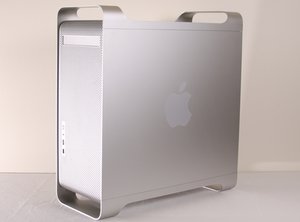
Power Mac G5は、2003年にApple Corporationが初めて製造したデスクトップコンピュータです。このガイドでは、2004年に発売されたApple Power Mac G5(モデル番号:A1047、EMC:2061)の修理プロセスについて説明します。 2006年にIntelプロセッサへの移行(まずは開発者向け、次に一般消費者向け)に伴い、生産が終了しました。

Possible G5 graphics card replacement?

Hello! I'm was trying to pull all the data off of an old Power Mac G5, and while the computer powered up just fine (fan running, audible responses to key strokes, etc.), I discovered the monitor (an old Mag InnoVision LT976s from 2003) no longer displays anything. To be clear: the monitor powers on, and displays options, etc. But it indicates it can't detect a signal from the computer.

Undaunted, I bought some new cables (VGA to DVI, DVI to DVI, etc.), and even (thanks to this site) tried my hand at removing the (very dusty) video card, wiping it off a little, and putting it back in. No dice.

As such: is the only option here to hunt down a new video compatible with an old G5? If so, does anyone have recommendations on what to buy? Note: I only need it to help me get the data off the computer, not to work particularly well or for the long haul — so it doesn't need to be particularly nice.

Any recommendations are welcome!

回答がありました! 回答を表示 同じ問題があります

この質問は役に立ちましたか?

スコア 1
コメントを追加

1 件の回答

ベストアンサー

You're going about it the hard way if all you want is the data. It's a serial ATA drive. Just pull the drive and put it in an external enclosure.

Here are enclosure options (make sure you get one for a 3.5" drive):

https://www.amazon.com/s?k=sata+external...

Here's how to pull the drive:

Power Mac G5 ハードドライブの交換

このアンサーは役に立ちましたか?

スコア 5

5 件のコメント:

Oh! This is super helpful.

Out of curiosity, I assume it'd be a bit more work on the back end to organize the data coming off the hard drive like that, yes? (I'm not really concerned about that, just curious — I've never worked with a hard drive pulled straight out of a computer before.)

さんによる

what computer are you transferring to or reading the drive froM?

さんによる

@mayer 14 inch 2021 MacBook Pro

さんによる

You will need a way to get from the external enclosure to your MBP. This cable will do that:

https://www.amazon.com/AmazonBasics-Type...

さんによる

Awesome. Thanks!

さんによる

コメントを追加

回答を追加する

Shalam さん、ありがとうございました!
統計データ:

過去 24時間: 0

過去 7 日: 1

過去 30 日: 17

今までの合計 527