メインコンテンツにスキップ
リペアコミュニティに参加 - アカウントの作成

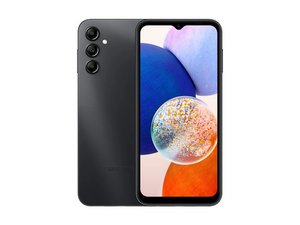
The Galaxy A14 is a low-end slate Android smartphone released by Samsung in January 2023 as a successor to the Samsung Galaxy A13. Identifiable by model number SM-A145 (followed by version/carrier-specific character.

My phone has stack when I open WiFi

My phone has stack when I open WiFi

この質問に回答する 同じ問題があります

この質問は役に立ちましたか?

スコア 1
コメントを追加

2件の回答

If your Samsung Galaxy A14 freezes or becomes unresponsive when you try to open Wi-Fi, here are some steps you can follow to resolve the issue

1. Restart Your Phone

  • How to do it: Hold the power button and tap "Restart."
  • This can help clear any temporary glitches.

2. Check for Software Updates

  • Steps:
    1. Go to SettingsSoftware update.
    2. Tap Download and Install.
  • Keeping your phone updated can resolve bugs.

3. Clear Cache for Wi-Fi

  • Steps:
    1. Go to SettingsApps.
    2. Tap the three-dot menu (top-right) → Show system apps.
    3. Search for Wi-Fi Direct or Wi-Fi settings.
    4. Select the app and tap Clear cache.

4. Reset Network Settings

  • Steps:
    1. Go to SettingsGeneral management.
    2. Select ResetReset network settings.
    3. Confirm the action.
  • Note: You’ll need to reconnect to Wi-Fi networks afterward.

5. Safe Mode

  • Boot your phone into Safe Mode to check if a third-party app is causing the issue:
    1. Turn off your phone.
    2. Turn it back on and press the Volume Down button until the home screen appears.
    3. Check if the issue persists.
    4. If the problem goes away, uninstall recently installed apps.

6. Free Up Storage

  • Since your device has limited storage left, it might cause performance issues.
  • Steps:
    1. Go to SettingsDevice careStorage.
    2. Delete unnecessary files or apps.

7. Factory Reset

  • If none of the above steps work, a factory reset might help:
    1. Go to SettingsGeneral managementReset.
    2. Select Factory data reset and follow the instructions.
  • Warning: Back up your data before proceeding.

If the issue persists after these steps, it might be a hardware issue, and you should consider visiting a Samsung service center.

このアンサーは役に立ちましたか?

スコア 0
コメントを追加

It has been seven days since my phone started doing this

このアンサーは役に立ちましたか?

スコア 0
コメントを追加

回答を追加する

Amiin Asker さん、ありがとうございました!
統計データ:

過去 24時間: 4

過去 7 日: 6

過去 30 日: 12

今までの合計 148