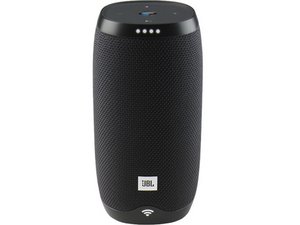

Power port not charging
My JBL Link 10 will not charge until I bend the cable upwards will it is in the port. Does anyone have a teardown of this to repair it?
この質問は役に立ちましたか?
スコア
2
評価: 35
 1
1
 1
1
My JBL Link 10 will not charge until I bend the cable upwards will it is in the port. Does anyone have a teardown of this to repair it?
この質問は役に立ちましたか?
評価: 25
2
Hello.
I believe this is a soldering issue.
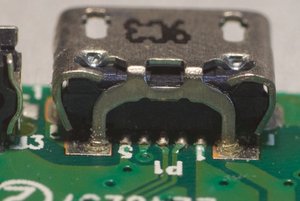
I am attaching a photo of it before the repair. The signal pins are lifting off the PCB due to the feet of the socket lifting off. It needs to be re-soldered.
このアンサーは役に立ちましたか?
How to open it & go up to the signal pins?
1. Slowly peel off the bottom rubber attached with double-sided tape.
2. Remove the two screws.
3. Lift the PCB.
4. Disconnect the two wires.
The important pins for power supply are 1 and 5. If necessary, scrape off the symbols for 1 and 5 and the green resist with a blade, and apply solder.
This PCB lacks the appropriate amount of solder during the manufacturing process, causing the USB connector pins to easily come off when inserting or removing the USB cable, making it unable to charge. Even if you purchase a PCB sold on eBay, this problem is generally unresolved, and re-soldering is essential.
I just joined to thank you for the fix. I was up to step 3 before finding this page and gave me the confidence to see it through. Those pins are tiny though, took me two attempts of testing the charging before it worked. Very tricky to avoid connecting the frame right next to both pins. Seems to work fine with pin 1 soldered to the frame.
過去 24時間: 2
過去 7 日: 6
過去 30 日: 45
今までの合計 2,595


 1.6千
1.6千 
1件のコメント
Hello I have exactly the same issue , I want to know what tools are needed to replace the broken USB Port? I can see, I need a soldering iron? is this the primary tool needed?
Brian Jang さんによる