メインコンテンツにスキップ
リペアコミュニティに参加 - アカウントの作成

Samsung Odyssey Notebookは、Samsung初のゲーミングコンピューターです。Odysseyは、手頃な価格で高解像度のゲーミング性能を実現しています。 モデル番号: NP800G5M

How do you replace the keyboard and mousepad assembly?

I spilled water on the keyboard a while back. Everything else still works flawlessly, however the keyboard and mousepad fail to work. I’m going to purchase the below part from Ebay that includes the keyboard, mouse and power button. Would it be possible to get a guide or a description on how to install this?
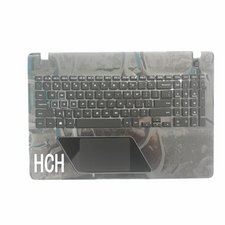

画像
この質問に回答する 同じ問題があります

この質問は役に立ちましたか?

スコア 0
コメントを追加

1 件の回答

最も参考になった回答

Do you have the guide booklet that came with the laptop?

Essentially, you will have to place the laptop upside down. Then unscrew the screws from the bottom of the laptop.

Pull out the keyboard and unplug the internal wires of the keyboard.

Do similar to the trackpad.

Replace the parts and check if everything works properly.

Screw the screws back to the bottom and the job is done.

I hope this helps

Admin

Apps4Rent | CloudDesktopOnline

このアンサーは役に立ちましたか?

スコア 2
コメントを追加

回答を追加する

Taiga - さん、ありがとうございました!
統計データ:

過去 24時間: 2

過去 7 日: 4

過去 30 日: 16

今までの合計 536