メインコンテンツにスキップ
リペアコミュニティに参加 - アカウントの作成

2018年9月21日に発売されたAppleの第4世代スマートウォッチ、オプションでセルラー機能付きApple Watch用ガイドです。

Ribbon Cable Damaged?

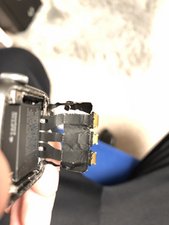
Dies the Ribbon Cable look damaged to you ? Because it looks a little bit bend and i want to be sure, to buy a new screen.

画像
画像
画像

I also connected the broken Lcd and it showed the half of the screen. Can you help me pls ?

回答がありました! 回答を表示 同じ問題があります

この質問は役に立ちましたか?

スコア 0
1件のコメント

I have a similar problem but far more serious I think. My cable tore completely on one side. Before removing the damaged screen the watch displayed the “connect to charged” lightening bolt icon. After connecting The new screen I have a dead watch. No life at all. Can the cable be replaced? If so, where can I get it?

さんによる

コメントを追加

1 件の回答

ベストアンサー

Well, the good news is the ripped cable is a shield to protect the signals within the other segments from distorting other signals. You will need to find a way to patch the electrical path between the torn halves.

As far as the screen not displaying the full image. That could be deeper damage in the other segments and/or it could be a damaged display assembly depending on how you lifted the display out.

The cables are part of the SIP module which is a costly part, and the display is also costly. I can’t tell you if you need the SIP or the display or both! Sorry ;-{

このアンサーは役に立ちましたか?

スコア 1

2 件のコメント:

Do the Ribbon Cables break easily or often ?

And yes the screen is damaged, i messed it up when i was separating the screen from the glass :(. The only concern i have , if i buy a new screen, it wont work because the ribbons are damaged. That would be a problem :(

さんによる

Lifting the foil shield is a bit tricky! Preventing stressing or damaging the data ribbons and the connectors takes a bit of care.

Sounds like you may have only damaged the screen. The displays crystal and the screen can't be separated! You need to replace the full assembly.

Only you know if you where too rough with the ribbon cables.

さんによる

コメントを追加

回答を追加する

The Unkownking さん、ありがとうございました!
統計データ:

過去 24時間: 0

過去 7 日: 10

過去 30 日: 56

今までの合計 1,978
