
メインコンテンツにスキップ

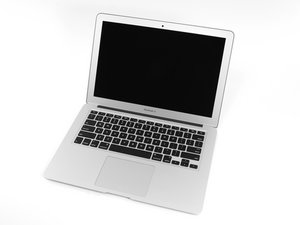
2014年4月のアップデートによりアップルの13インチMacBook Airはデュアルコアi5またはi7プロセッサーの更新とわずかなバッテリー性能の向上がされました。

Hall effect sensor - screen closed

Hi,

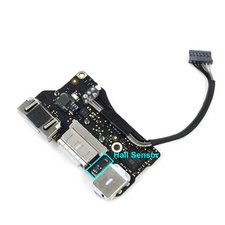
I have just been replacing my screen but the hall effect (sensor that detects the close of the screen to put in sleep mode) is not working anymore. I have found that this sensor is on the I/O board but I do not know where and how I can fix it. Thanks,

回答がありました! 回答を表示 同じ問題があります

この質問は役に立ちましたか?

スコア 0
コメントを追加

2件の回答

ベストアンサー

What part did you replace exactly, the screen assembly ? The hall sensor connects to the I/O board and it’s on the topcase, but it needs the magnet on the lid to be working properly. Unless the sensor was damaged somehow the only reasonable alternative explanation is that your replacement screen is missing the magnet. If you have a magnet around it will be quite easy to verify which of the two fits your case.

このアンサーは役に立ちましたか?

スコア 1
コメントを追加

If you replaced the display you might have dislodged the magnet held in the lid frame, or the hall sensor is bad

Block Image

Using a rare earth magnet slide it across the uppercase where the sensor is located you should see the display turn on and off as you pass it across the sensor. Use a piece of tape to mark the location and now using a steel paperclip locate the magnet in the lid and marking its location the two marked locations should meet up. If not you either got the wrong lid assembly or the magnet is missing or got placed in the wrong hollow when you replaced the LCD panel.

このアンサーは役に立ちましたか?

スコア 1
コメントを追加

回答を追加する

Pierre-Luc Vérité さん、ありがとうございました!
統計データ:

過去 24時間: 0

過去 7 日: 1

過去 30 日: 3

今までの合計 459