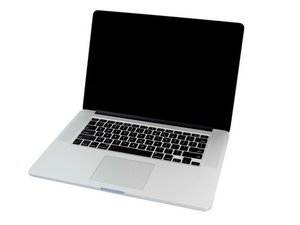

adjusting the trackpad click
How do I adjust the trackpad on my Retina MBP? The mouse click suddenly became almost impossible to make happen.
この質問は役に立ちましたか?
スコア
3
評価: 47
 4
4
 1
1
How do I adjust the trackpad on my Retina MBP? The mouse click suddenly became almost impossible to make happen.
この質問は役に立ちましたか?
評価: 502.7千
35
347
 977
977
If cleaning didn't help you'll need to get your system to an Apple Store for repair. Given the age of your system I would think it would be under warranty.
There is no IFIXIT guide for the retina models to remove or repair the Trackpad due to the fact you will destroy the battery in the process!
The best I can offer you is this IFIXIT image of the trackpad on a different model:
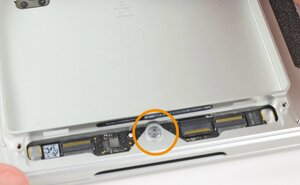
Here you can see the adjustment screw which is the large head screw circled is the adjuster. If you replace the battery often the frame can warp a tiny bit so do check the level of the case using a straight edge across the plane once the case it's self is level using a fine depth gage or digital measuring caliber.
Again this is a very big job as almost everything needs to be removed to get to the trackpad.
このアンサーは役に立ちましたか?
I popped the back off, and blew out the dust, and could see that the batteries cleverly hide the track pad. I have adjusted earlier model track pads, so it was disappointing to see that this was inaccessible. It seems to be working a little better now. I will likely take it in, if it continues to be troublesome though. Thanks.
If this answer answered your question please remember to rate (score) and mark it accepted.
@danj Any chance to post the picture of the location of the adjustment screw in the answer as I have to adjust one of these, New battery is safely out etc ready to adjust a non responsive click (No play) TP.
@livfe - I had posted originally an older model in a link. Here's a better picture of this models. If the battery swelled the tang tends to bend. I suspect Apple either reduced the metal structure or was using a lower grade of Aluminum (softer) as the 2014's often need a bit of a bend to fix.
評価: 13
2
Hi, bit late in replying to this but have just come across it. What can happen is that the batteries age and swell up slightly putting pressure on to the underside of the trackpad, so affecting the click ability. The batteries tend start to fail after about three years. They're glued in so difficult to change unfortunately.
このアンサーは役に立ちましたか?
Yes, your right! If someone encounters this issue today.
Back then in '14 just aprox a year out the battery shouldn't have been the issue. Which is why the focus was on the trackpad its self as well as going to Apple to get the system serviced by them as this would have been covered under warranty at that time.
評価: 11
2
OMG dont go by that picture. thats how to remove the trackpad, and this is only for the 2012-14 retina. the 2015 retina has force touch, a whole different monster. If suddenly you cant click your trackpad, do you keep your MacBook plugged in all the time??? because your battery may be expanding! get that thing in for servicing quick!
このアンサーは役に立ちましたか?
This is a 2013 system not 2015 which agreed is very different!
@danj have a 2015 model and there is no visible screw to adjust (2013-14 are different) :( I have ordered a replacement TP & Cable for $12 from a local supplier of MBP parts here, that should fix the problem :) Thanks though for adding the pic for 2013-14 models :). I recently put in a new battery so it came out quite easily, I just need to use some fresh DS tape to stick it back :)
@livfe - That is correct the 2015 systems onward don't have the adjustment screw! That's because they are haptic, that's the coil you see underneath which vibrates (under the metal plate on the '15 model) MacBook Pro 15" Retina (Mid 2015) Trackpad. Visible here in the 2016 MacBook Pro 15" Retina (Late 2016-2019) Trackpad
You need a new unit or cable if it's damaged. The Q was on the 12~14 models.
過去 24時間: 0
過去 7 日: 6
過去 30 日: 31
今までの合計 10,999




3 件のコメント
Did you by chance spill something onto the trackpad? If you did you may want to try cleaning the area. Carefully moisten a paper towel with some kitchen counter cleaner like: Fantastic Remember! Don't spray any cleaner onto your system, wet the towel you don't want the cleaner to go to far here.
Once your sure the trackpad edge is not gummed up so it can move you may need to adjust the click plate from the inside. Sadly, you'll need to remove the glued in battery to get to it which means you'll need to replace it in the process <Ouch!>
Frankly, if cleaning the top didn't free it up I would get your system to an Apple Store for them to repair it. It might even be covered under warranty!
DanJ さんによる
I did not, and have not ever, spilled anything on my track pad. That said, I did clean around the edges with my fingernail, and got some crud out. Pushing down on the top left and right corners is not helping. Can I get to the adjusting screws by removing the back plate?
archrenov8 さんによる
You shed skin and hand cream can find its way into the groove. Also I should point out the top edge does not depress only the bottom 1/2 from the mid point of the pad down to the bottom edge across from left to right.
DanJ さんによる