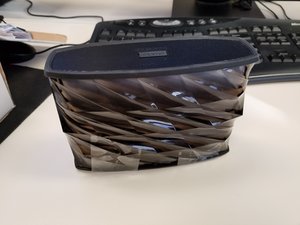
学生によって寄稿されたWiki
iFixit学生教育プログラムに参加している素晴らしい学生チームが、このWikiを作成しました。
接続
iHomeまたはソースデバイスからのBluetooth接続に問題があります。例えば、スマートフォンは接続されているのに音声が流れない場合などです。
Bluetoothがオンになっているか
ソースデバイスのBluetooth設定がオンになっていることを確認してください。デバイス上のBluetoothシンボルが点滅ではなく、完全に点灯している必要があります。
iHomeのBluetoothボタン
iHomeボタンを青いライトが点灯するまで長押しして、電源を入れます。Bluetoothボタンは、デバイスのコントロールセンターの左隅にあります。青いライトが点滅するまでこのボタンを押し続けます。点滅は同期の準備が完了したことを示します。
USBケーブルが機能しない
付属のミニUSBケーブルが動作しません。
接続されているか
USBケーブルの両端がしっかりと差し込まれていることを確認してください。USBポート自体に問題がある可能性があるため、こちらのマザーボードの修理ガイドを確認してください。
外部損傷
ワイヤリングが完全に無傷であることを確認してください。ワイヤの一部が露出している場合は、絶縁テープで保護してください。
ケーブルの断線
これらを試しても問題が解決しない場合は、交換を依頼するか、新しいUSBケーブルを購入してください。
デバイスが応答しない
デバイスが反応しません。スピーカーから音が出ない、またはスピーカーの電源が入らない状態です。
デバイスの電源が入っているか
電源が入っているか確認してください。電源ボタンを押してデバイスをオンにすると、電源ボタン付近で青いライトが点滅し始めます。
フル充電されているか
デバイスが完全に充電されていることを確認してください。充電中は、電源ボタン付近に赤いライトが点灯します。デバイスはフル充電された状態でのみ電源が入る点に注意してください。
デバイスをリセットする
デバイスが応答しない場合は、リセットを行ってください。デバイスをオンにした状態で、背面にあるリセットボタンを2秒間押し込みます。ボタンのある穴にアクセスするには小さなピンが必要です。
接続を確認する
デバイスがBluetoothに接続されているか確認してください。Bluetooth接続時は、青いライトが点滅せず、点灯し続けます。スマートフォンなどのソースデバイスにBluetoothシンボルが表示されているはずです。
照明
デバイスのライトが点灯しない場合は、スピーカーを電源スイッチに接続し、電源ボタンを2秒間長押ししてデバイスをリセットしてください。
再起動する
ライトが点灯しないままの場合は、カラーモードボタンを押してください。効果がない場合はカスタマーサービスに連絡してください。製品の分解に慣れている場合は、こちらのライト交換ページを確認してください。

チーム

University of North Texas, Team S1-G3, Thompson Fall 2017 University of North Texas, Team S1-G3, Thompson Fall 2017人のメンバー
UNT-THOMPSON-F17S1G3
4 メンバー
24のガイドは作成済み

14 件のコメント
First time poster. My iPhone will not charge went thru trouble shooting guid and even with a new working usb cord the iPhone will not charge. From what I can tell the male USB port is damaged. Is this component serviceable?
Austin - 返信 共有
Whenever the lights are turned on there is a high pitched sound whether the music is playing or not. It starts immediately upon the lights being turned on.
Earlena McKee - 返信 共有
Hi
i just bought an iHome speaker iBT78 and the battery level is full, successfully paired, playing music, but the lights doesn’t work!!! Nothing not a single light! I’ve been trying everything…. pulsing the light button turning it on and of and on again…. somebody help me please sad
Ivonne Castro - 返信 共有
Hi ,
Can you please tell me how long will it take the battery to go full ?
Jeet - 返信 共有
Theres one way I came across to playing music on the speaker and that was to using the double sided cord connecting the speaker and phone together defeating the whole purpose of using wireless bluetooth…
My phones gives me the option to unpair but its not connected and when i connect other speakers its says connected right next to the name of the speaker thats bluetoothed. On the speaker the blue light is still blinking when i read that when its connected its supposed to stay blue without flashing in your guide… ive made sure all connections are on, turned bluetooth speaker / my cell off n back on multiple times, checked if all cords are plugged in right after buying new usb charging cords as well, charged it to a full battery, tried pairing while charging too, tried pairing to other phones and even reset the speaker. STILL GOT NOTHING
Help please???????
Christine Lopez - 返信 共有