学生によって寄稿されたWiki
iFixit学生教育プログラムに参加している素晴らしい学生チームが、このWikiを作成しました。
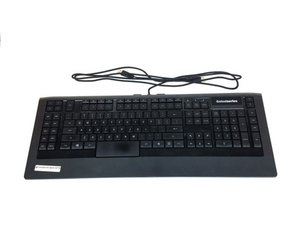
このトラブルシューティングページは、SteelSeries Apex 64145で発生する問題を診断するために役立ちます。
キーが反応しない
キーを押しても、一部またはすべてのキーが反応しません。
USBポートの不具合
キーボードを接続するコンピューターの別のUSBポートに切り替えてください。コンピューター側のポートが故障しているか、デバイスを正しく認識できていない可能性があります。ポートが故障している場合は、こちらの修理ガイド SteelSeries Apex 64145 USBポートコネクタの交換 を確認してください。
ドライバーの不具合
キーボードを接続してもコンピューターがデバイスを検出しない場合は、SteelSeriesのウェブサイト こちらのリンク から、最新バージョンのドライバー、または以前の正常に動作したバージョンをインストールしてみてください。
キーの破損
キーが物理的に破損している(ひび割れ、傷、位置のずれ)場合は、キーの交換方法を説明した修理ガイドを参照してください。 SteelSeries Apex 64145 キーの交換
LEDライトが点灯しない
接続してもキーボードが点灯しません。
LEDの故障
新しいLEDライトを購入して交換する必要があります。LEDの交換方法と購入すべきLEDのタイプについては、こちらの修理ガイドを参照してください。 SteelSeries Apex 64145 LEDの交換
キーボードがぐらつき、安定しない
ゴム製のスタンドが紛失、または破損しています。
スタンドの摩耗や損傷
摩耗したスタンドを、キーボードの箱に同梱されている予備のスタンドと交換してください。スタンドの交換方法については、こちらの修理ガイドを参照してください。 SteelSeries Apex 64145 ラバースタンドの交換
キーが引っかかっている
キーを押しても元の位置に戻りません。
キーの汚れ
キーが外れるまで慎重に上にこじ開け、室温の水でキーを丁寧に洗浄してください。キーを乾燥させた後、キーボードの元の位置にゆっくりと押し込んでください。
コンピューターがキーボードを認識しない
コンピューターのデバイス一覧にキーボードが表示されない、またはSteelSeries Engineに表示されません。
USBポートの接続不備
キーボードが、正しく認識されないタイプのUSBポートに接続されている可能性があります。例えば、現在USB 2.0ポートに接続している場合は、USB 3.0ポートに接続し直してみてください。キーボードの両方のUSBプラグが、同じタイプのUSBポートに差し込まれていることを確認してください。
ドライバーの不具合または欠落
現在のドライバーが最新であり、コンピューターに正しくインストールされているか確認してください。SteelSeriesのウェブサイト こちらのリンク で、ソフトウェアのダウンロード手順を確認してください。

チーム

USF Tampa, Team S1-G1, Nance Spring 2017 USF Tampa, Team S1-G1, Nance Spring 2017人のメンバー
USFT-NANCE-S17S1G1
4 メンバー
60のガイドは作成済み

4 件のコメント
PART-1
The problem I am having is that a few keys are not triggering anymore
the keys are as follows:
(the period key, greater-than key, question mark key, right shift key & finally the quotation mark key) I might have to get the plastic circuit sheets to replace the ones I have. because it seems that part of the plastic circuit sheets might be damaged some how. I was playing a video game and then poof out of no where all the lights on the keyboard went out and keyboard stopped responding
I unplugged the keyboard and even tested it on another computer and it didnt want to go back on
so i opened the keyboard to check if something burnt out, I cleaned everything with rubbing alcohol and let it dry. put everything back together and boom keyboard started to function only to have the keys mentioned above not working I re-opened the keyboard several times to make sure nothing was pinching anything.
Twsted - 返信 共有
PART-2
i even tested it by just pressing the circuit allocated connections from the 3 plastic circuits sheets under the membrain sheet within the within the keyboard and it would not type those keys out,
but it does it for all the other keys. So im sure the plastic circuit sheets are damaged for some odd reason hoping that if I call or email Steelseries, that I can purchased a new set of circuit sheets from them.
This is my favorite keyboard as I do LOVE chiclets keyboards
I wish Steelseries would make a newer version of this APEX-350 without taking away ANY of the sets of keys or layout it already has , but rather improve on it. and have every key lit up individually colored - I can only wish
If Steelseries could make a Chiclet `mechanical` keyboard that would be insane :)
like a APEX-350 MARK-II mechanical keyboard, I would be first in line to buy it.
Twsted - 返信 共有
I have a problem so I left on holiday 3 weeks ago my keyboard apex pro tkl 2023 wireless was fine but when I came home it would not work at all . The plugs are in everything is in but won’t work at all. The led wouldn’t turn on , it doesn’t even show the menu pad . Won’t show anything when I’m charging it either . Can somebody help ?
Geek - 返信 共有
some of my keys f9-f12 light up orange and my keyboard just stops working
Kayston Phillips - 返信 共有