学生によって寄稿されたWiki
iFixit学生教育プログラムに参加している素晴らしい学生チームが、このWikiを作成しました。
デバイスの電源が入らない
デバイスの充電ができない、または電源が入らない状態です。
充電ケーブルの不具合
デバイス側とコンセント側のケーブル接続がしっかりと行われているか確認してください。充電ランプが点灯しない場合は、充電器の不具合が考えられます。充電器の交換を検討してください。
バッテリーの不具合
デバイスの充電ランプが点灯していても、プラグを抜くと充電されなかったり、電源が入ったままにならない場合は、バッテリーが故障しています。こちらの修理ガイドを使用してバッテリーを交換してください。
写真や動画の画質が歪む
動画や画像が歪んでいる、ぼやけている、または変色しています。
カメラレンズの汚れ
カメラレンズにゴミや汚れがないか点検してください。汚れが見つかった場合は、ガラスクリーナーでレンズを拭いてください。レンズの裏側にゴミがある場合は、こちらの修理ガイドに従ってレンズを取り外し、レンズ内部を清掃してください。
カメラレンズの損傷
カメラレンズに欠け、ひび割れ、傷がないか点検してください。これらが見つかった場合は、こちらの修理ガイドを使用してレンズを交換してください。
音質が悪い
動画再生中の音声が聞き取りにくい状態です。
マイクの汚れ
録画した音声の品質が歪んでいる場合は、エアダスターを使用してデバイスのマイクを清掃してください。
スピーカー/マイクの不具合
エアダスターでマイクを清掃しても改善しない場合は、こちらの修理ガイドを使用してデバイスのスピーカーを交換してください。
デバイスのオーバーヒート
デバイスが突然電源オフになったり、画面にオーバーヒートのメッセージが表示されたりします。
バッテリーのオーバーヒート
バッテリーが非常に熱くなっている、またはオーバーヒートしていると感じたら、こちらの修理ガイドに従ってバッテリーを取り外してください。バッテリーを取り出した状態で、再び使用を試みる前に室温まで冷ましてください。
SDカードの処理速度不足
一般的に、写真や動画をSDカードに記録する際、デバイスの温度が上昇することがあります。SDカードが極端に熱くなっていたりオーバーヒートしている場合は、新しいSDカードの購入を検討してください。
環境による影響
デバイスが熱を帯びやすい高温または乾燥した場所に置かれている場合は、温度が下がるところへ移動させてください。
他のデバイスに接続できない
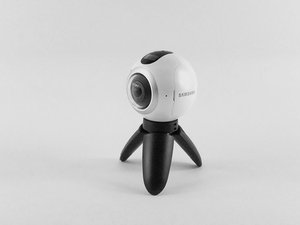
Samsung Gear 360が他のデバイスに正しく接続されません。
Samsung Gearアプリから再接続する
スマートフォンでGear 360アプリを起動します。スマートフォンのBluetoothとWi-Fi Directが自動的にオンになります。「接続」をタップし、画面の指示に従って接続を完了させてください。接続に失敗する場合は、デバイスを再起動し、Bluetooth設定で検出可能になっているか確認してください。
Samsung Gear 360が動作中にフリーズする
バッテリーを取り外して再度挿入してください。通常はこれでカメラが再起動しますが、あまりにも頻繁に発生しています。
タイムラプス機能が設定通りの間隔で撮影できない
この問題に対する解決策は見つかっていません。

チーム

USF Tampa, Team S3-G5, Sullivan Spring 2017 USF Tampa, Team S3-G5, Sullivan Spring 2017人のメンバー
USFT-SULLIVAN-S17S3G5
4 メンバー
84のガイドは作成済み

28 件のコメント
I have new gear 360 2017. It turns on andconnects.. ...until I put in the sd card.. then it won't turn on.
rob hoy - 返信 共有
If the Samsung 360 will not turn on. Plug it into your power source and hold down the power button and the menu button at the same time, for fifteen seconds. This worked for my 360.
Mary Kelly - 返信 共有
Think I might have stumbled upon a solution of sorts: I had problems connecting my Gear 360 camera with the Gear 360 (New) app on my Samsung S6. No help from tech support, as usual. So, after bumbling around, I thought I'd
1. Uninstall Samsung Accessory Service (in the app manager).
2. I also uninstalled the Gear 360 app.
3. Unpaired the Gear 360 camera on Bluetooth.
4. Re-started everything.
5. Re-installed just the Gear 360 app on my phone.
6. Attempted to re-connect the Gear 360 camera from within the app.
7. I believe this would trigger the app to automatically install the proper Samsung Accessory Service app.
8. The app started to connect properly to the camera.
Now, the app still isn't impressive but at least that got the camera to connect to the phone app.
Good luck.
bastogne97 - 返信 共有
Just had the same problem, but i was able to fix it by reformatting the SD Card.
To check if this is the problem just remove the sd card and see if it turns on. If it does and says "No SD Card" try putting it back in and if it turns off again then you should reformat the SD Card to exFat32 on your computer. It worked for me and maybe it could work for you as well.
W Marketing Group - 返信 共有
I just bought the Gear 360 (2017) and paired it with my Galaxy S8+ .. it took a couple of photos using the phone and the Gear 360 (new) app. Then on taking the third photo it got stuck on "Capturing". No matter what i do it will not take photos now. I restarted it , the phone nothing happens. the shutter button on the camera also doesnt not works. if i reset it using the app, it will take a couple of photos and then the same issue.
any suggestion guys ?
Craig - 返信 共有