学生によって寄稿されたWiki
iFixit学生教育プログラムに参加している素晴らしい学生チームが、このWikiを作成しました。
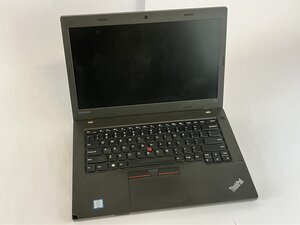
Lenovo Thinkpad L460のバッテリー残量が多いにもかかわらず突然シャットダウンしたり、ランダムにクラッシュしたりする場合は、このガイドが役立つ可能性があります。
バッテリーセルの劣化または消耗したバッテリー
- Lenovo Vantageでバッテリーの状態を確認する
- Lenovo Vantage > 電源 > バッテリー状態の順に移動します。
- 「不調」または「交換」と表示されている場合は、Lenovo Thinkpad L460のバッテリーを交換してください。
残留電荷による充電サイクルの阻害
- バッテリーのリセットを実行する
- Lenovo ThinkPad L460の電源を切り、ACアダプターとバッテリーを取り外します。
- 電源ボタンを30秒間押し続け、再度接続して再起動します。
古いBIOSまたは電源ドライバー
- システムファームウェアをアップデートする
- Lenovoのサポートサイトから最新のBIOSおよび電源管理ドライバーをダウンロードします。
バッテリーのハードウェア故障
- バッテリーを交換する
- Lenovo ThinkPad L460のリアカバーを取り外します。
- マザーボードからバッテリーのコネクタを取り外し、Lenovo純正のバッテリーに交換します。バッテリーの交換については、こちらの修理ガイドを参照してください。

チーム

UMass Dartmouth, Team 2-4, Bowman Fall 2025 UMass Dartmouth, Team 2-4, Bowman Fall 2025人のメンバー
UMASSD-BOWMAN-F25S2G4
4 メンバー
72のガイドは作成済み

0 件のコメント