学生によって寄稿されたWiki
iFixit学生教育プログラムに参加している素晴らしい学生チームが、このWikiを作成しました。
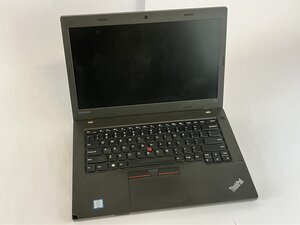
Lenovo ThinkPad L460が充電されない、電源が入らない、プラグを差し込んでも表示灯が点灯しない、アダプターが熱くなる、あるいはブーンという音がする場合、この修理ガイドが解決策となる可能性があります。
電源アダプターの故障
- 目視による損傷の確認
- アダプターのコードにほつれ、曲がり、焦げ跡がないか確認してください。
- 損傷が見られる場合は、充電ケーブルを交換してください。
アダプターが適切な電圧を出力していない
- マルチメーターで出力をテストする
- Lenovoのアダプターは20V DC程度の出力が必要です。
- 数値が計測されない、または変動する場合は、充電ケーブルを交換してください。
アダプターユニットの故障
- 正常なLenovoの充電ケーブルで試す
- 他の充電ケーブルで正常に動作する場合、元のケーブルは故障しているため交換が必要です。
DC充電ポートの損傷
- 充電ポートの点検または交換
- 充電ポートに緩みや腐食がないか確認してください。
- 損傷している場合はポートを交換してください。

チーム

UMass Dartmouth, Team 2-4, Bowman Fall 2025 UMass Dartmouth, Team 2-4, Bowman Fall 2025人のメンバー
UMASSD-BOWMAN-F25S2G4
4 メンバー
72のガイドは作成済み

0 件のコメント