メインコンテンツにスキップ
リペアコミュニティに参加 - アカウントの作成

iPod Nano 1st Generation Click Wheel Replacement

必要な工具と部品

  1. iPod Nano 1st Generation Click Wheel Replacement, Rear Panel: 手順 1、 1の画像 1
    • Before opening your iPod, ensure that the hold switch is in the locked position.

    FixBotに聞いてみる
  2. iPod Nano 1st Generation Click Wheel Replacement: 手順 2、 1の画像 1
    • The rear panel is secured to the front case by eleven clips permanently attached to the rear panel. These clips lock onto small tabs machined into the front case.

    • To free the tabs, they must be pushed down and away from the iPod's case. Note the location of all tabs on the rear panel. When using an iPod opening tool to free the rear panel, be sure to work the tool at the location of these clips.

    FixBotに聞いてみる
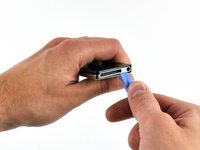
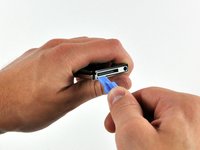
  3. iPod Nano 1st Generation Click Wheel Replacement: 手順 3、 2の画像 1 iPod Nano 1st Generation Click Wheel Replacement: 手順 3、 2の画像 2
    • Opening the iPod can be challenging. Don't get discouraged if it takes you a few tries before the iPod is opened.

    • Insert the large iPod opening tool into the seam between the front case and rear panel of the iPod, below the dock connector. Run the tool back and forth to create an opening. The tool's edge should point toward the rear panel to prevent any accidental scratching of the aluminum front case.

    FixBotに聞いてみる
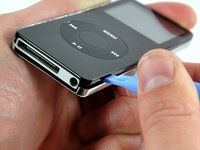
  4. iPod Nano 1st Generation Click Wheel Replacement: 手順 4、 1の画像 1
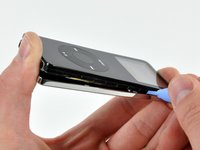
    • Insert a small iPod opening tool into the seam on the Hold button side of the iPod, with the edge of the tool pointing toward the rear panel.

    FixBotに聞いてみる
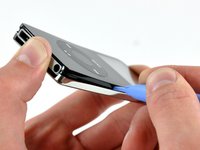
  5. iPod Nano 1st Generation Click Wheel Replacement: 手順 5、 1の画像 1
    • The large iPod opening tool is no longer needed to gain access to the left side of the iPod.

    • Gently enlarge the existing gap by pressing/wiggling the small iPod opening tool into the gap near each of the two tabs attached to the rear case, pushing the clips toward the center of the iPod until both have been freed.

    FixBotに聞いてみる
  6. iPod Nano 1st Generation Click Wheel Replacement: 手順 6、 3の画像 1 iPod Nano 1st Generation Click Wheel Replacement: 手順 6、 3の画像 2 iPod Nano 1st Generation Click Wheel Replacement: 手順 6、 3の画像 3
    • Repeat the same procedure listed in the previous step to free the five clips along the headphone jack side of the iPod.

    FixBotに聞いてみる
  7. iPod Nano 1st Generation Click Wheel Replacement: 手順 7、 1の画像 1
    • After ensuring all tabs are free, separate the two halves of the iPod.

    • The rear panel is now free from the iPod.

    FixBotに聞いてみる
  8. iPod Nano 1st Generation Click Wheel Replacement, Battery & Logic Board: 手順 8、 1の画像 1
    • Remove any kapton tape over the screws, if necessary.

    • Remove the following 3 screws:

    • Two 3 mm Phillips screws near the dock connector.

    • One 4 mm Phillips screw along the edge of the logic board.

    • During reassembly, make sure to put back any tape or plastic you remove. This will prevent any shorts between the logic board and the rear panel. If your tape is unusable, kapton tape can be purchased online.

    FixBotに聞いてみる
  9. iPod Nano 1st Generation Click Wheel Replacement: 手順 9、 1の画像 1
    • Peel up the ground strap connecting the battery to the logic board.

    FixBotに聞いてみる
  10. iPod Nano 1st Generation Click Wheel Replacement: 手順 10、 2の画像 1 iPod Nano 1st Generation Click Wheel Replacement: 手順 10、 2の画像 2
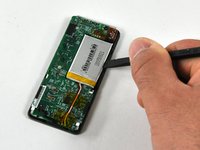
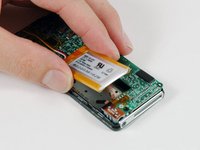
    • Insert the flat end of a spudger between the battery and the headphone jack side of the front case to pry the battery up off the adhesive securing it to the front case.

    • Rotate the battery out of the iPod and lay it next to the iPod. The battery is still soldered to the logic board by three wires, so don't remove it entirely.

    FixBotに聞いてみる
  11. iPod Nano 1st Generation Click Wheel Replacement: 手順 11、 1の画像 1
    • Gently lift up on the dock connector end of the logic board to ensure the logic board is free.

    FixBotに聞いてみる
  12. iPod Nano 1st Generation Click Wheel Replacement: 手順 12、 1の画像 1
    • Grasp the end of the logic board near the battery connector with one hand, and hold onto the rest of the iPod with your other hand.

    • Make sure the logic board is lifted slightly above the white plastic notch on the battery side of the board. This notch prevents the board from sliding out in the next step.

    • Slide the logic board out of its holding brackets on the rear of the display.

    • The logic board is still connected to the iPod by two ribbon cables.

    FixBotに聞いてみる
  13. iPod Nano 1st Generation Click Wheel Replacement: 手順 13、 1の画像 1
    • Disconnecting the following two ribbon cables may be challenging. To prevent straining the cables or connectors, you can only separate the two halves of the iPod about 1/2 inch during the process.

    • Use a spudger to flip up the black plastic tab holding the orange display ribbon in place. The black tab will rotate up 90 degrees, releasing the ribbon cable.

    FixBotに聞いてみる
  14. iPod Nano 1st Generation Click Wheel Replacement: 手順 14、 1の画像 1
    • Use a spudger to slide the display ribbon out of its connector.

    FixBotに聞いてみる
  15. iPod Nano 1st Generation Click Wheel Replacement: 手順 15、 1の画像 1
    • Use a spudger to flip up the black plastic tab holding the orange click wheel ribbon in place. The black tab will rotate up 90 degrees, releasing the ribbon cable.

    FixBotに聞いてみる
  16. iPod Nano 1st Generation Click Wheel Replacement: 手順 16、 1の画像 1
    • Use a spudger to slide the click wheel ribbon out of its connector.

    FixBotに聞いてみる
  17. iPod Nano 1st Generation Click Wheel Replacement: 手順 17、 1の画像 1
    • The logic board and battery are now free from the iPod.

    FixBotに聞いてみる
  18. iPod Nano 1st Generation Click Wheel Replacement, Display: 手順 18、 1の画像 1
    • Use a spudger to carefully pry up the adhesive holding down the edge of the display.

    • Be careful not to slide the spudger in too far to prevent scratching the display.

    FixBotに聞いてみる
  19. iPod Nano 1st Generation Click Wheel Replacement: 手順 19、 1の画像 1
    • Gently lift up on one corner of the display to separate the adhesive holding the display in place.

    • Lift up on the other corner of the display in the same manner.

    FixBotに聞いてみる
  20. iPod Nano 1st Generation Click Wheel Replacement: 手順 20、 1の画像 1
    • Lift the display up and out of the iPod.

    FixBotに聞いてみる
  21. iPod Nano 1st Generation Click Wheel Replacement: 手順 21、 1の画像 1
    • The display is now free from the iPod.

    FixBotに聞いてみる
  22. iPod Nano 1st Generation Click Wheel Replacement, Click Wheel Cover: 手順 22、 1の画像 1
    • Lift up on the click wheel cover and carefully thread the orange click wheel ribbon through the slot in the click wheel cover.

    • Lift the click wheel cover out of the iPod.

    FixBotに聞いてみる
  23. iPod Nano 1st Generation Click Wheel Replacement, Click Wheel: 手順 23、 1の画像 1
    • Use a spudger to pry up the orange click wheel ribbon from the front panel.

    • Be careful not to bend the click wheel ribbon too much, or it might damage the electronics on the cable.

    FixBotに聞いてみる
  24. iPod Nano 1st Generation Click Wheel Replacement: 手順 24、 1の画像 1
    • Lift the click wheel out of the front panel.

    FixBotに聞いてみる
終わりに

To reassemble your device, follow these instructions in reverse order.

13 の人々がこのガイドを完成させました。

作成者

1人の作成者と共同作成されました。

iRobot

メンバー登録日: 09/24/09

1 ポイント

636のガイドは作成済み

0件のガイドコメント

コメントを追加

統計データ:

過去 24時間: 3

過去 7 日: 23

過去 30 日: 131

今までの合計 29,497