メインコンテンツにスキップ
リペアコミュニティに参加 - アカウントの作成

Yujin Robot iCLEBO Arte Battery Replacement Guide

必要な工具と部品

  1. Yujin Robot iCLEBO Arte Battery Replacement Guide, Battery: 手順 1、 3の画像 1 Yujin Robot iCLEBO Arte Battery Replacement Guide, Battery: 手順 1、 3の画像 2 Yujin Robot iCLEBO Arte Battery Replacement Guide, Battery: 手順 1、 3の画像 3
    • Locate and unscrew the two 15mm screws with a Phillips #2 screwdriver.

    FixBotに聞いてみる

    コメントを追加

  2. Yujin Robot iCLEBO Arte Battery Replacement Guide: 手順 2、 3の画像 1 Yujin Robot iCLEBO Arte Battery Replacement Guide: 手順 2、 3の画像 2 Yujin Robot iCLEBO Arte Battery Replacement Guide: 手順 2、 3の画像 3
    • Remove both screws shown by rotating them counter-clockwise.

    FixBotに聞いてみる

    コメントを追加

  3. Yujin Robot iCLEBO Arte Battery Replacement Guide: 手順 3、 1の画像 1
    • Remove the battery compartment's lid.

    FixBotに聞いてみる

    コメントを追加

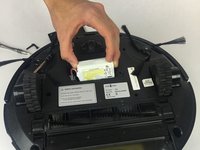
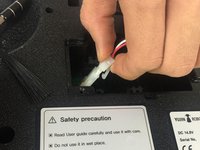
  4. Yujin Robot iCLEBO Arte Battery Replacement Guide: 手順 4、 2の画像 1 Yujin Robot iCLEBO Arte Battery Replacement Guide: 手順 4、 2の画像 2
    • Slide the battery out, and disconnect it from the robot by squeezing the tab on the power cable.

    • If you pull too hard on the connector without properly squeezing the tab, something will break.

    FixBotに聞いてみる

    コメントを追加

終わりに

To reassemble your device, follow these instructions in reverse order.

キャンセル: このガイドを終了できませんでした。

ある他の人がこのガイドを完成しました。

作成者

2人の作成者と共同で作成されました。

Trent Bingel

メンバー登録日: 02/28/17

437 ポイント

4のガイドは作成済み

チーム

USF Tampa, Team S2-G3, Nance Spring 2017 USF Tampa, Team S2-G3, Nance Spring 2017人のメンバー

USFT-NANCE-S17S2G3

4 メンバー

14のガイドは作成済み

1件のガイドコメント

Tried 2 different new batteries and still won’t charge

desrn55 - 返信 共有

コメントを追加

統計データ:

過去 24時間: 3

過去 7 日: 7

過去 30 日: 35

今までの合計 3,129