メインコンテンツにスキップ
リペアコミュニティに参加 - アカウントの作成

Xiaomi Redmi Note 4X Battery Replacement

必要な工具と部品

  1. Xiaomi Redmi Note 4X Battery Replacement, Removing the back cover: 手順 1、 3の画像 1 Xiaomi Redmi Note 4X Battery Replacement, Removing the back cover: 手順 1、 3の画像 2 Xiaomi Redmi Note 4X Battery Replacement, Removing the back cover: 手順 1、 3の画像 3
    • The first thing we have to do is use a pry tool to remove the back cover (make sure to remove the sim tray first)

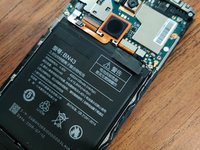
  2. Xiaomi Redmi Note 4X Battery Replacement, Removing the Battery: 手順 2、 3の画像 1 Xiaomi Redmi Note 4X Battery Replacement, Removing the Battery: 手順 2、 3の画像 2 Xiaomi Redmi Note 4X Battery Replacement, Removing the Battery: 手順 2、 3の画像 3
    • Now we have to remove the battery, luckily the Battery can be removed first after taking the back cover off.

  3. Xiaomi Redmi Note 4X Battery Replacement, Reassembly: 手順 3、 2の画像 1 Xiaomi Redmi Note 4X Battery Replacement, Reassembly: 手順 3、 2の画像 2
    • Now you can insert your new battery, pop the back cover on, and your good to go! Congratulations, you've just replaced your phone's battery.

終わりに

Congratulations on repairing your smartphone!

2 の人々がこのガイドを完成させました。

作成者

1人の作成者と共同作成されました。

Isaiah Kochis

メンバー登録日: 09/02/20

235 ポイント

2のガイドは作成済み

0件のガイドコメント

コメントを追加

統計データ:

過去 24時間: 1

過去 7 日: 8

過去 30 日: 53

今までの合計 3,959