メインコンテンツにスキップ
リペアコミュニティに参加 - アカウントの作成

Xbox One Wireless Controller Model 1708 Top Motherboard Replacement

必要な工具と部品

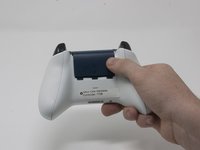
  1. Xbox One Wireless Controller Model 1708 Top Motherboard Replacement, Cover Plate: 手順 1、 2の画像 1 Xbox One Wireless Controller Model 1708 Top Motherboard Replacement, Cover Plate: 手順 1、 2の画像 2
    • Slide the battery cover toward the top of the controller to remove it.

    • Lift up the batteries or the battery pack from the battery compartment.

    FixBotに聞いてみる

    コメントを追加

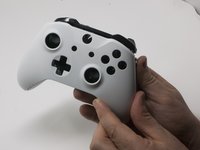
  2. Xbox One Wireless Controller Model 1708 Top Motherboard Replacement: 手順 2、 2の画像 1 Xbox One Wireless Controller Model 1708 Top Motherboard Replacement: 手順 2、 2の画像 2
    • Insert a plastic opening tool into the top seam, and gently work the opening tool to the bottom of the controller.

    • Continue using the opening tool to gently pry the side plate off of the controller.

    • Repeat this process for the second side plate.

    FixBotに聞いてみる

    コメントを追加

  3. Xbox One Wireless Controller Model 1708 Top Motherboard Replacement: 手順 3、 1の画像 1
    • Gently peel the battery label or punch a hole in the center of the sticker in the battery compartment to reveal the hidden screw.

    • Remove the five 9mm torx-9 security screws from the back of the controller.

    FixBotに聞いてみる

    コメントを追加

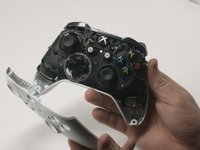
  4. Xbox One Wireless Controller Model 1708 Top Motherboard Replacement: 手順 4、 2の画像 1 Xbox One Wireless Controller Model 1708 Top Motherboard Replacement: 手順 4、 2の画像 2
    • Orient the controller so the front plate is facing up.

    • Lift the front cover off of the controller.

    FixBotに聞いてみる

    コメントを追加

  5. Xbox One Wireless Controller Model 1708 Top Motherboard Replacement: 手順 5、 1の画像 1
    • Turn the controller face down and gently lift the rear plate.

    • Be careful with the rumble motors, as they tend to fall out, risking damage to the motherboard.

    FixBotに聞いてみる

    コメントを追加

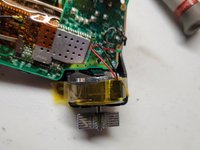
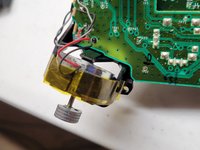
  6. Xbox One Wireless Controller Model 1708 Top Motherboard Replacement, Tape Shock Motors in place: 手順 6、 3の画像 1 Xbox One Wireless Controller Model 1708 Top Motherboard Replacement, Tape Shock Motors in place: 手順 6、 3の画像 2 Xbox One Wireless Controller Model 1708 Top Motherboard Replacement, Tape Shock Motors in place: 手順 6、 3の画像 3
    • Tape the Rumbler/shock motors in place.

    • This will prevent the motors from falling out.

    FixBotに聞いてみる

    コメントを追加

  7. Xbox One Wireless Controller Model 1708 Top Motherboard Replacement, Directional Pad: 手順 7、 1の画像 1
    • Turn the device over and remove the directional pad by gently pulling it away from the controller.

    FixBotに聞いてみる

    コメントを追加

  8. Xbox One Wireless Controller Model 1708 Top Motherboard Replacement, Joystick Caps: 手順 8、 1の画像 1
    • Pull the joysticks off of the controller.

    FixBotに聞いてみる

    コメントを追加

  9. Xbox One Wireless Controller Model 1708 Top Motherboard Replacement, Top Motherboard: 手順 9、 1の画像 1
    • If the rumble motors fall out of frame, the wires may disconnect from the motherboard . The wires will have to be soldered to reattach the motor.

    • Turn the device over and remove the two 7mm torx-6 screws in the bottom left and right corners.

    FixBotに聞いてみる

    コメントを追加

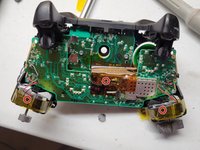
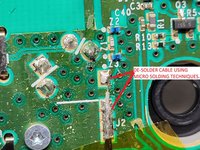
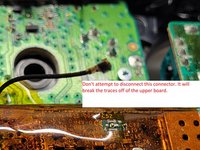
  10. Xbox One Wireless Controller Model 1708 Top Motherboard Replacement, De-soldering required: 手順 10、 3の画像 1 Xbox One Wireless Controller Model 1708 Top Motherboard Replacement, De-soldering required: 手順 10、 3の画像 2 Xbox One Wireless Controller Model 1708 Top Motherboard Replacement, De-soldering required: 手順 10、 3の画像 3
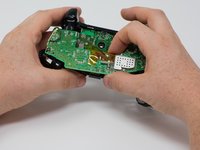
    • Firmly grasp the top and bottom motherboards in opposite hands, then gently pull them apart.

    • The top motherboard is still connected to the bottom motherboard. To fully separate the top motherboard, you will need to use a soldering iron.

    • Warning: Do not attempt to disconnect the shielded (gold colored) connector as it is extremely fragile you will break it. It runs between the two boards.

    • De-solder the shielded cable from the lower board instead of attempting to disconnect the connector. De-solder using micro soldering techniquest.

    FixBotに聞いてみる

    コメントを追加

終わりに

To reassemble your device, follow these instructions in reverse order.

キャンセル: このガイドを終了できませんでした。

25 の人々がこのガイドを完成させました。

作成者

9人の作成者と共同で作成されました。

Lien (Ally) Quan

メンバー登録日: 09/25/17

1,095 ポイント

1ガイドが承認済み

チーム

Cal Poly, Team S18-G3, Forte Fall 2017 Cal Poly, Team S18-G3, Forte Fall 2017人のメンバー

CPSU-FORTE-F17S18G3

4 メンバー

42のガイドは作成済み

1件のガイドコメント

Necesito un diagrama donde pueda ver el esquemático de los vibradores del gatillo

Héctor Bohórquez - 返信 共有

コメントを追加

統計データ:

過去 24時間: 9

過去 7 日: 73

過去 30 日: 401

今までの合計 36,215