メインコンテンツにスキップ
リペアコミュニティに参加 - アカウントの作成

VTech MobiGo Touch Learning System Screen Replacement

必要な工具と部品

    1. VTech MobiGo Touch Learning System Screen Replacement, Case: 手順 1、 1の画像 1
      • Remove the battery covers and the four batteries.

      FixBotに聞いてみる

      コメントを追加

    2. VTech MobiGo Touch Learning System Screen Replacement: 手順 2、 2の画像 1 VTech MobiGo Touch Learning System Screen Replacement: 手順 2、 2の画像 2
      • Remove the four plastic caps with a metal spudger to expose the 6.0 mm Philips JIS #0 case screws.

      • Remove the eight 6.0 mm JIS #0 case screws.

      FixBotに聞いてみる

      コメントを追加

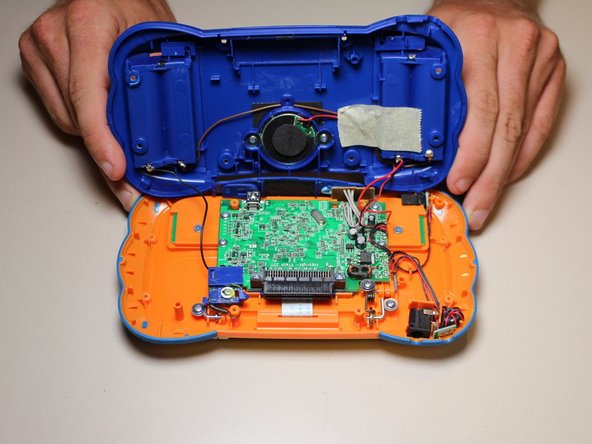
    3. VTech MobiGo Touch Learning System Screen Replacement: 手順 3、 2の画像 1 VTech MobiGo Touch Learning System Screen Replacement: 手順 3、 2の画像 2
      • Using a plastic opening tool, separate the two pieces of the case carefully.

      FixBotに聞いてみる

      コメントを追加

    1. VTech MobiGo Touch Learning System Screen Replacement, Disassembling VTech MobiGo Touch Learning System Screen Enclosure: 手順 4、 1の画像 1
      • Remove the three 4.0 mm Philips J0 screws holding the "L" shaped brackets in place.

      FixBotに聞いてみる

      コメントを追加

    2. VTech MobiGo Touch Learning System Screen Replacement: 手順 5、 1の画像 1
      • Remove the three "L" shaped brackets and the spring.

      FixBotに聞いてみる

      コメントを追加

    3. VTech MobiGo Touch Learning System Screen Replacement: 手順 6、 1の画像 1
      • Flip the device over and remove the three 4.0 mm Philips J0 case screws.

      FixBotに聞いてみる

      コメントを追加

    4. VTech MobiGo Touch Learning System Screen Replacement: 手順 7、 1の画像 1
      • Separate the front and back of the case.

      • Use a plastic opening tool if necessary.

      FixBotに聞いてみる

      コメントを追加

    1. VTech MobiGo Touch Learning System Screen Replacement, Screen: 手順 8、 1の画像 1
      • Remove the 4 (3.4 mm Philips J0) screws holding the screen in

      FixBotに聞いてみる

      コメントを追加

    2. VTech MobiGo Touch Learning System Screen Replacement: 手順 9、 1の画像 1
      • Remove the black tape

      FixBotに聞いてみる

      コメントを追加

    3. VTech MobiGo Touch Learning System Screen Replacement: 手順 10、 1の画像 1
      • Remove the circuit board from the back of the screen.

      • The circuit board has double sided tape on the back side holding it to the screen.

      FixBotに聞いてみる

      コメントを追加

    4. VTech MobiGo Touch Learning System Screen Replacement: 手順 11、 1の画像 1
      • Peel the ribbon wire off of the circuit board. Now the screen should be free to remove.

      FixBotに聞いてみる

      コメントを追加

    5. VTech MobiGo Touch Learning System Screen Replacement: 手順 12、 1の画像 1
      • Resolder the new screens ribbon cable on the the circuit board.

      • Always be careful when soldering.

      FixBotに聞いてみる

      コメントを追加

終わりに

To reassemble your device, follow these instructions in reverse order.

キャンセル: このガイドを終了できませんでした。

2 の人々がこのガイドを完成させました。

作成者

4人の作成者と共同で作成されました。

Daniel Kresge

メンバー登録日: 09/01/15

409 ポイント

4のガイドは作成済み

チーム

USF Tampa, Team 8-3, Eyestone Fall 2015 USF Tampa, Team 8-3, Eyestone Fall 2015人のメンバー

USFT-EYESTONE-F15S8G3

3 メンバー

17のガイドは作成済み

1件のガイドコメント

mine i droped a rock on so i don’t get it

Jesse Eagan - 返信 共有

コメントを追加

統計データ:

過去 24時間: 3

過去 7 日: 11

過去 30 日: 37

今までの合計 1,262